WriteBackExtreme is slow or unresponsive

A typical reason of a slow experience is the database connection itself. Especially databases that are not running in the same network can be slower.

When the management console for example is also slow you can take a look at the application performance. Open Powershell and navigate to the directory where WriteBackExtreme.exe is located. Run this command to see the statistics of the internal workers:

./WriteBackExtreme.exe workers --interactive

This will generate an interactive statistics table like so:

Note: The amount of rows (workers) is dependent on the amount of processor cores available on the machine.

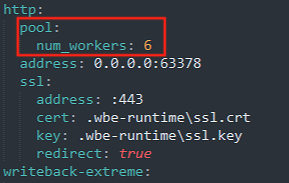
When this shows a lot of Memory or CPU consumption it could be a good idea to increase the number of workers. Alter the wbe.config.toml configuration file in the installation directory, and add a num_workers option to the http part like so:

Note: Indentation in the wbe.config.toml file matters! Always use 2 spaces as indentation.

Warning: Increasing the amount of workers to more than 30 will not increase performance, and can lead to unwanted behavior.

Last updated

Was this helpful?