

Security & permissions
Dashboard extensions are web applications, and like web page objects, they can be running on web servers that could be located outside of your local domain. Before adding an extension to the dashboard, or viewing a dashboard that has an extension, you want to be certain you trust the web sites that host them.
By default, dashboard extensions must be running over the HTTPS protocol, which guarantees an encrypted channel for sending and receiving data, and ensures some privacy and security.
Allowing the extension access
Unlike web page objects, dashboard extensions can have access to the summary data (visible data) in a view, or can have access to the underlying data and information about the data source (names of tables, columns) and information about the data source connection. When you add an extension, or view a dashboard that has an extension, you have the opportunity to allow or deny the extension to run.
If you are adding an extension and you decide to not allow the extension to run, you return to the Choose an extension dialog box.
If you are viewing a dashboard that contains an extension that requires full data access, but that access is not granted, a message appears in place of the extension. If you trust the extension and want to use it, you can reset the permission and allow the extension to run.
Resetting permissions
You can choose to allow the extension to run by clicking Reset Permissions from the More Options drop-down menu of the layout container. This opens up the Allow Extensions dialog box where you can change permissions for the extension and allow it to run.
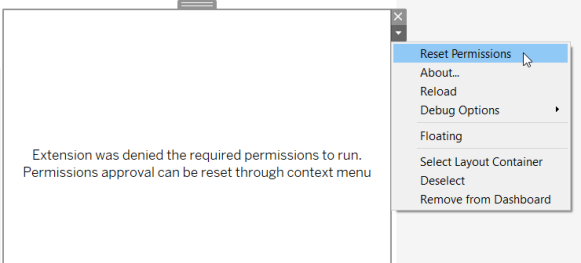
You can also choose to deny the extension permission, by clicking Reset Permissions from the drop-down menu for the extension. This opens up the Allow Extensions dialog box where you can change permissions for the extension so that it is not allowed to run.
Enable JavaScript
Dashboard extensions interact with the data in the dashboard using the Tableau Extensions API library, a JavaScript library. If you want to use extensions, be sure to enable JavaScript in the dashboard security settings (Help > Settings and Performance > Set Dashboard Web View Security > Enable JavaScript).
Last updated
Was this helpful?