

Identifying, testing & support
This page helps admins and users verify extension details and safely support them.
As a web application, an extension is associated with a URL. You use this URL to test and verify the extension. You also use the URL to add the extension to the safe list to allow full data access, or to the block list to prohibit any access.
If you have the extension manifest file (.trex), an XML file that defines properties for the extension, you can find the URL from the element.
https://www.example.com/myExtension.html
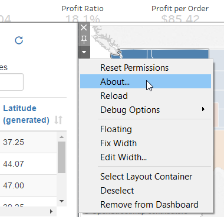
If you have added the extension to the dashboard, you can find the URL from the extension properties. From the More Options menu, click About.
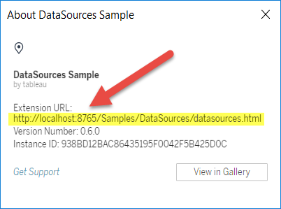
The About dialog box lists the name of the extension, the author of the extension, the web site of the author, along with the URL of the extension.
Testing extensions securely
Best practices:
Test extensions in non-production environments
Validate hosting URLs
Confirm HTTPS usage
Review external JavaScript libraries
Extensions hosted on http://localhost are allowed only for local testing.
Dashboard extensions are web applications that interact with data in Tableau using the Extensions API. Dashboard extensions contain JavaScript and could be hosted on sites outside of your domain. Because of this and the potential vulnerabilities, such as cross-site scripting, you should test and vet dashboard extensions before users use them in dashboards on Tableau Desktop, and before you allow extensions on Tableau Server.
Examine the source files
Dashboard extensions are web applications and include various HTML, CSS, and JavaScript files, and an XML manifest file (*.trex) that defines the properties in the extension. In many cases, the code for a dashboard extension is publicly available on GitHub and can be examined there or downloaded. In the manifest file (*.trex), you can find the source location, or URL indicated where the extension is hosted, the name of the author, and the web site of the author or company to contact for support. The element specifies in the URL, the element, specifies the name of the organization and the web site to contact for support (website="SUPPORT_URL"). The web site is the Get Support link user see in the About dialog box for the extension.
Many dashboard extensions reference external JavaScript libraries, such as the jQuery library or API libraries for third parties. Validate that the URL for external libraries points to a trusted location for the library. For example, if the connector references the jQuery library, make sure that the library is on a site that is considered standard and safe.
All extensions are required to use HTTPS protocol (https://) for hosting their extensions. You should examine the source files for the extension to ensure that any reference to external libraries is also using HTTPS or is hosted on the same web site as the extension. The one exception to the requirement of HTTPS is if the extension is hosted on the same computer as Tableau (http://localhost).
To the extent possible, make sure you understand what the code is doing. In particular, try to understand how the code is constructing requests to external sites, and what information is being sent in the request. In particular, check if any user-supplied data is validated to prevent cross-site scripting.
Understand data access
The Tableau Extensions API provides methods that can access the names of the active tables and fields in the data source, the summary descriptions of the data source connections, and the underlying data in a dashboard. If an extension uses any of these methods in a view, the extension developer must declare that the extension requires full data permission in the manifest file (.trex). The declaration looks like the following.
Tableau uses this declaration to provide a prompt to users at run time that gives them the option of allowing this access or not. If the extension uses any one of these four methods, without declaring full-data permission in the manifest file, the extension will load but the method calls will fail.
For information about how an extension accesses data from the dashboard, and the JavaScript methods used, see Accessing Underlying Data in the Tableau Extensions API. To get a better understanding about what the extension can find out about the data, you can use the DataSourcessample dashboard extension (available from the Tableau Extensions API GitHub repository) to see what data is exposed when the getDataSourcesAsync() method is called.
Test the extension in an isolated environment
If possible, test the dashboard extension in an environment that is isolated from your production environment and from user computers. For example, add a dashboard extensions to a safe list on a test computer or virtual machine that’s running a version of Tableau Server that is not used for production.
Monitoring extension traffic
When you test a dashboard extension, use a tool like Fiddler, Charles HTTP proxy, or Wireshark to examine the requests and responses that the extension makes. Make sure that you understand what content the extension is requesting. Examine the traffic to be sure that the extension is not reading data or code that is not directly related to the purpose of the extension.
Getting support
Of course, we would love to share our knowledge and passion for extensions with you. Get in touch with us and let us know what you like or where you need some help.
To get help for a specific extension, use the dashboard extension support link. You can find this link by opening the About dialog box for the extension.
Select the extension zone in the dashboard, click More Options from the drop-down menu in the upper-right corner, and click About.
In the About dialog box, click Get Support. This link takes you to the support page of the developer or company that created the extension.
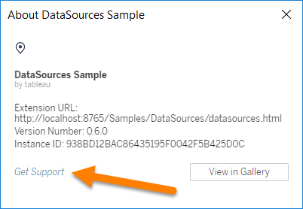
Tableau provides limited customer support for dashboard extensions. Tableau does not provide support for extensions or for other programs written to interface with the Extensions API. However, you can submit questions and ask for help on the Tableau developer community forums.
Tableau does provide support for the Extensions API library and SDK, though. If you find an issue with the Extensions API library or any of the developer samples, submit an issue on GitHub.
Of course, you can always get in touch with one of our Extensions specialists and developers
Last updated
Was this helpful?