> For the complete documentation index, see [llms.txt](https://docs.infotopics.com/llms.txt). Markdown versions of documentation pages are available by appending `.md` to page URLs; this page is available as [Markdown](https://docs.infotopics.com/writebackextreme/v5.0/installation-guide/upgrade.md).
# Upgrade
When upgrading to the latest version, it's crucial to follow the correct procedure. Ensure to adhere to the specified steps for upgrading from your current version:
* [For upgrades from 2.0](#upgrading-from-2.x-to-3.0)
* [Subsequently, upgrade from 3.0 to the latest version available.](#upgrade-from-3.x-and-higher)
{% hint style="info" %}
Before initiating an upgrade, it is strongly advised to create backups of both the filesystem and database. This precautionary measure ensures that in the event of any unexpected issues during the upgrade process, you can revert to a stable state using the backed-up data.
{% endhint %}
### Upgrade from 3.0 and higher
This can be done easily by doing the following steps:
1. **Download the latest version**\
Go to the [Apps for Tableau Enterprise Portal](https://my-appsfortableau.infotopics.com/login) and download the latest version of WriteBackExtreme.
2. **Backup files and database**\
Create a backup of the WriteBackExtreme folder on your server. Also create a backup of your (repository or default) database.
{% tabs %}
{% tab title="Windows" %}
* Go to the folder were the WriteBackExtreme.exe is located.
* Open the WriteBackExtreme.exe file with administrator privileges
* Click the `Open configuration` button
* Click the red `Stop WriteBackExtreme` button
* 
* Close the window
* Unzip the zip file that is downloaded in step 1
* Override the original `WriteBackExtreme.exe` with the extracted one
* Open the `WriteBackExtreme.exe` file with administrator privileges
* WriteBackExtreme will automatically start. It could take some additional time to start since because of running updates on the first run.
* Done!
* You can verify the latest version with changes in the management console.
{% endtab %}
{% tab title="Linux" %}
* Extract the zip file that is downloaded from our portal.
* Make sure the installl.sh is exectuable by running `sudo chmod +x ./install.sh`
* Run the installation script: `sudo ./install.sh`
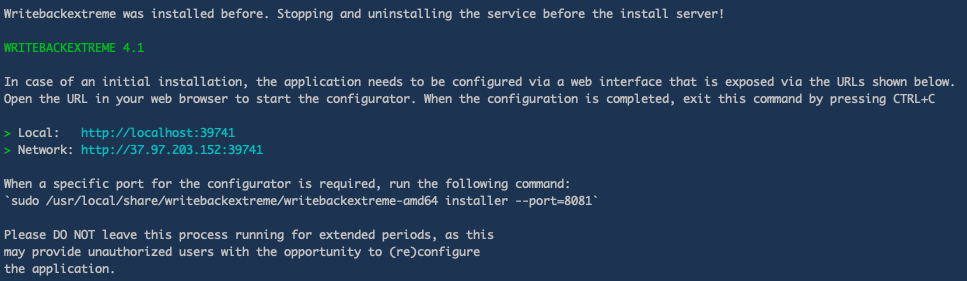
* When it is finished you should see this message:
* Hit `CTRL+C` to close the configurator.
* In some cases, the server wont restart automatically. restart it manually by running this command:
`sudo service WriteBackExtreme restart`
* Done!
* Open the browser and navigate to the management console to verify if the service is up and running.
{% endtab %}
{% endtabs %}
---
# Agent Instructions
This documentation is published with GitBook. GitBook is the documentation platform designed so that both humans and AI agents can read, navigate, and reason over technical content effectively. Learn more at gitbook.com.
## Querying This Documentation
If you need additional information that is not directly available in this page, you can query the documentation by asking a question.
Perform an HTTP GET request on the following URL with the `ask` and `goal` query parameters:
```
GET https://docs.infotopics.com/writebackextreme/v5.0/installation-guide/upgrade.md?ask=&goal=
```
`ask` is the immediate question: it should be specific, self-contained, and written in natural language.
`goal` is what the user is ultimately trying to achieve, the reason they need the answer. Sharing it helps GitBook give you a better, more relevant answer. A goal is most helpful when it describes the outcome the user wants rather than restating the question. For example, with `ask=how do I create an API token`, a goal like `automate deployments from our CI pipeline` lets GitBook tailor the answer to that use case.
The response will contain a direct answer to the question and relevant excerpts and sources from the documentation.
Use this mechanism when the answer is not explicitly present in the current page, you need clarification or additional context, or you want to retrieve related documentation sections.