> For the complete documentation index, see [llms.txt](https://docs.infotopics.com/llms.txt). Markdown versions of documentation pages are available by appending `.md` to page URLs; this page is available as [Markdown](https://docs.infotopics.com/writebackextreme/v4.0/prologue/architecture.md).

# Architecture

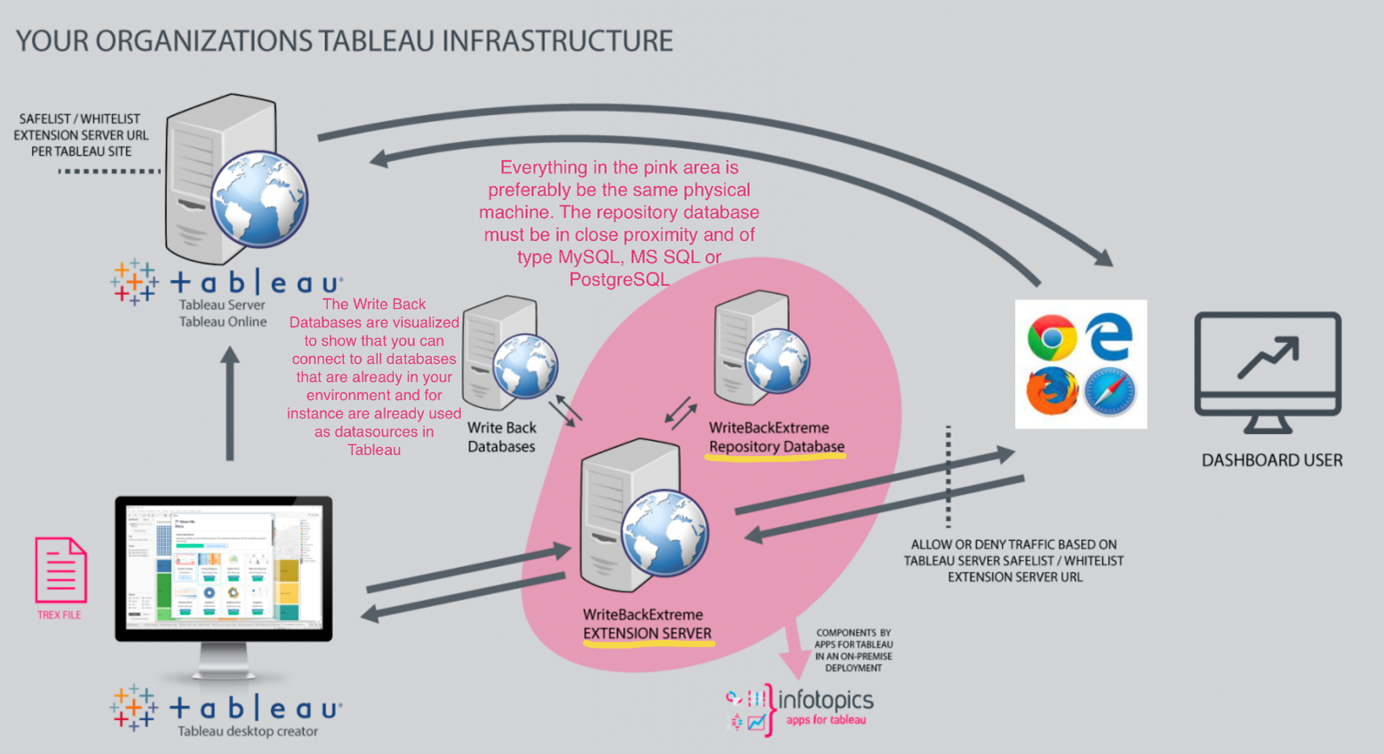
We have created an image to show the infrastructure of the WriteBackExtreme extension. This shows what actually happens when you call in your WriteBackExtreme extension to your dashboard.

There’s a connection to the WriteBackExtreme extension server where it will serve the necessary JavaScript, HTML and CSS to the dashboard for the extension to be rendered there (the rendering of the extension is client side). Write back transactions are handled by the WriteBackExtreme Extension server through API calls.

A repository database is required (supported database types for the repository database are listed below) and a connection to your database where you can write directly to is probably already present in your infrastructure (Write Back databases, the common data sources you use for your Tableau Reporting as well).

Whitelisting/Safelisting of the Extension Server URL needs to be done on Tableau Server/Tableau Online to allow communication with the extension server for users visiting your published dashboard. Communication with the WriteBackExtreme extension server will only take place from the clients side (whether it is Tableau Desktop or a visitor of a published workbook in the browser). As already mentioned, rendering of the extension will take place in the dashboard (client side).

<figure><img src="https://appsfortableau.infotopics.com/wp-content/uploads/2022/02/Tableau-Infrastructure.png" alt=""><figcaption></figcaption></figure>

### Where does the write back data live?

The WriteBackExtreme extension can connect to multiple databases by setting up different connections in your Management Console. Use the plugins tab of your management console to see the available database drivers you can connect to. If you miss a specific driver please contact our support.

The writeback data lives in the tables of databases that are (already) present in your infrastructure; the data sources already available to your (Tableau) infrastructure. When creating your (DATA Helper and ADD Data) schemas in the management console, the actual tables will be added to your database automatically by the extension. Changing your schema in the Management console will also change the actual tables in the database. Because of this automation by the extension it is highly recommended not to manually alter the tables created by the extension (and do all changes through the Management console of the extension).

You can also connect to existing tables to change data that already resides in tables in your databases (using the DATA Correction module). The DATA Correction module allows you to change data that is already present in your database and therefore will not create its own table but use the existing table. Be aware that Data correction changes your actual data!

The WriteBackExtreme extension can set up connections to different databases and the data will always remain in the database you select during the creation of the schema.

### Where does the data live for repository and which databases are supported?

A database will be set up when installing WriteBackExtreme for repository data. This will be a separate database from your Write Back databases, preferably installed on the same machine as the WriteBackExtreme extension server, this is to avoid lag and performance degradation.

A data repository is the logical aggregation of data items from separate databases into one centralized location for a specific purpose that cannot be achieved using the databases themselves. There is no server side processing of your data, auditing and logging information will be stored in the Repository database. The configuration and connection information of the WriteBackExtreme extension will also be stored (in an encrypted way of course) in the Repository database

## Supported databases

<table data-header-hidden><thead><tr><th width="103"></th><th></th></tr></thead><tbody><tr><td><img src="https://2527144630-files.gitbook.io/~/files/v0/b/gitbook-x-prod.appspot.com/o/spaces%2FxHQtQB2fBuq9GybGD8hM%2Fuploads%2FOM8sdz71RUUx3rxdWHA3%2Fmysql.png?alt=media&amp;token=ae09d945-bb7e-463f-8887-2d4dde6ed848" alt="" data-size="original"></td><td>MySQL version 5.7, 8.0 or higher</td></tr><tr><td><img src="https://2527144630-files.gitbook.io/~/files/v0/b/gitbook-x-prod.appspot.com/o/spaces%2FxHQtQB2fBuq9GybGD8hM%2Fuploads%2FJqWS1nfCcprSEUyq5d9V%2Fsqlsrv.png?alt=media&amp;token=cb217ffc-b1c3-4c9c-b09e-07a343c42eba" alt="" data-size="original"></td><td>Microsoft SQL Server 2016 or later</td></tr><tr><td><img src="https://2527144630-files.gitbook.io/~/files/v0/b/gitbook-x-prod.appspot.com/o/spaces%2FxHQtQB2fBuq9GybGD8hM%2Fuploads%2FhOzOQc8UI2VHgWS98vwr%2Fpgsql.png?alt=media&amp;token=47013ed6-011a-44b9-9dff-b685ef15337b" alt="" data-size="original"></td><td>PostgreSQL version 14 or later</td></tr><tr><td><img src="https://2527144630-files.gitbook.io/~/files/v0/b/gitbook-x-prod.appspot.com/o/spaces%2FxHQtQB2fBuq9GybGD8hM%2Fuploads%2FGRZLXchyQySMJP8mq4nO%2Fsnowflake.png?alt=media&amp;token=6d6ac611-0464-4d1e-b465-34b0714d9c04" alt="" data-size="original"></td><td><p>Snowflake via ODBC or natively</p><p>(Editing a schema is partially supported because of database limits)</p></td></tr><tr><td><img src="https://2527144630-files.gitbook.io/~/files/v0/b/gitbook-x-prod.appspot.com/o/spaces%2FxHQtQB2fBuq9GybGD8hM%2Fuploads%2FwbbSlqhJ5Sh0Y0ppYg9R%2Fredshift.png?alt=media&amp;token=f6915968-7d82-4274-ae18-09b25ae3438f" alt="" data-size="original"></td><td>Amazon Redshift</td></tr><tr><td><img src="https://2527144630-files.gitbook.io/~/files/v0/b/gitbook-x-prod.appspot.com/o/spaces%2FxHQtQB2fBuq9GybGD8hM%2Fuploads%2FtdmGqxKnSISrNeO58zeN%2Foracle.png?alt=media&amp;token=ae123b42-8144-4c5d-9986-2b0028de7c71" alt="" data-size="original"></td><td>Oracle via OCI8 ^2.2.0 or 3.0 </td></tr><tr><td><img src="https://2527144630-files.gitbook.io/~/files/v0/b/gitbook-x-prod.appspot.com/o/spaces%2FxHQtQB2fBuq9GybGD8hM%2Fuploads%2Fu1zpWq5RBwoSSc1KT7dO%2Fsynapse.png?alt=media&amp;token=2e14c211-5738-49dc-83fd-a3bfa1b3d9bb" alt="" data-size="original"></td><td>Azure Synapse<br>(Text fields are limited to 4000 characters)</td></tr><tr><td><img src="https://2527144630-files.gitbook.io/~/files/v0/b/gitbook-x-prod.appspot.com/o/spaces%2FxHQtQB2fBuq9GybGD8hM%2Fuploads%2FclXffry4AKeMxAct9NsB%2Fbigquery.png?alt=media&amp;token=702452ba-f5b2-4a7a-b8ea-b5046a596b9a" alt="" data-size="original"></td><td>Google Big Query<br><br>Keep in mind that GBQ has <a href="https://cloud.google.com/bigquery/quotas">Quotas and limits</a>. For example it is limited to 1500 Table modifications per day which makes it less usable for data correction. </td></tr><tr><td><img src="https://2527144630-files.gitbook.io/~/files/v0/b/gitbook-x-prod.appspot.com/o/spaces%2FxHQtQB2fBuq9GybGD8hM%2Fuploads%2FjZOKypn3IlFalNQS3iI1%2Fteradata.png?alt=media&amp;token=491caae1-4136-4d49-b9f5-25ca84af35f2" alt="" data-size="original"></td><td>Teradata via ODBC</td></tr><tr><td><img src="https://2527144630-files.gitbook.io/~/files/v0/b/gitbook-x-prod.appspot.com/o/spaces%2FxHQtQB2fBuq9GybGD8hM%2Fuploads%2FFBDdpkSPoKnBBC46Natq%2Fdatabricks.png?alt=media&amp;token=5e926e4f-667d-4591-8f84-2d05aecffb2a" alt="" data-size="original"></td><td>Databricks via ODBC</td></tr></tbody></table>

\ <br>


---

# Agent Instructions
This documentation is published with GitBook. GitBook is the documentation platform designed so that both humans and AI agents can read, navigate, and reason over technical content effectively. Learn more at gitbook.com.

## Querying This Documentation
If you need additional information that is not directly available in this page, you can query the documentation by asking a question.

Perform an HTTP GET request on the following URL with the `ask` and `goal` query parameters:

```
GET https://docs.infotopics.com/writebackextreme/v4.0/prologue/architecture.md?ask=<question>&goal=<user_goal>
```

`ask` is the immediate question: it should be specific, self-contained, and written in natural language.
`goal` is what the user is ultimately trying to achieve, the reason they need the answer. Sharing it helps GitBook give you a better, more relevant answer. A goal is most helpful when it describes the outcome the user wants rather than restating the question. For example, with `ask=how do I create an API token`, a goal like `automate deployments from our CI pipeline` lets GitBook tailor the answer to that use case.

The response will contain a direct answer to the question and relevant excerpts and sources from the documentation.

Use this mechanism when the answer is not explicitly present in the current page, you need clarification or additional context, or you want to retrieve related documentation sections.
