> For the complete documentation index, see [llms.txt](https://docs.infotopics.com/llms.txt). Markdown versions of documentation pages are available by appending `.md` to page URLs; this page is available as [Markdown](https://docs.infotopics.com/trulyp/writebackextreme/workflows.md).
# Workflows
Want something to happen when people write data from Tableau? Workflows send the data to another system the moment a record is created, updated, deleted or imported. Notify a sales manager in Teams, start a Salesforce flow, or run a stored procedure in your database: it's all possible.
A workflow belongs to a schema. You manage all of them in **WriteBackExtreme** › **Workflows**, or per schema on the schema's **Workflows** tab.
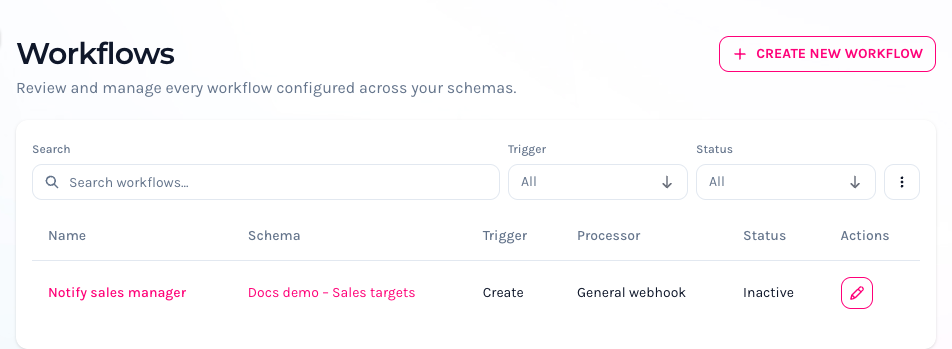
WriteBackExtreme › Workflows
The list shows each workflow's **Name**, **Schema**, **Trigger**, **Processor** and **Status** (Active or Inactive). Clicking a workflow opens it on its schema's **Workflows** tab.
### Create a workflow
Click **Create new workflow**, or **New workflow** on a schema's **Workflows** tab.
Create new workflow, with the preview at the bottom
1. Choose the **Schema** (on the schema's tab it's already chosen) and enter a **Name**.
2. Choose the **Trigger**: when the workflow runs.
| Trigger | Runs when |
| ---------- | ------------------------------------------------------------------------------------------------------------------------------------ |
| **Create** | A record is created. |
| **Update** | A record is changed. |
| **Delete** | A record is deleted. |
| **Import** | Records are imported in bulk. Turn on **Only send first value per field** to send one value per field instead of every imported row. |
In a Data Correction schema, every change counts as an **Update**.
3. Choose the **Processor**: where the data goes. See [Processors](#processors).
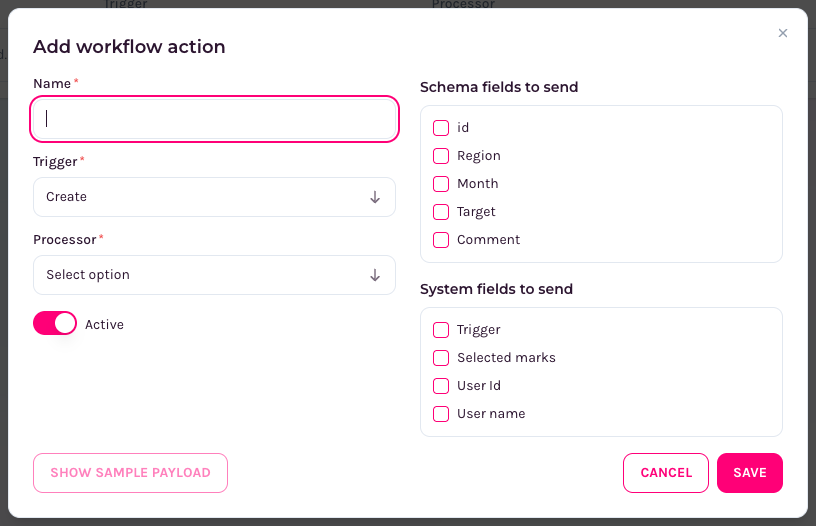
4. Choose the data to send:
* **Schema fields to send**: the fields of the record.
* **System fields to send**: **Trigger** (which trigger fired), **Selected marks** (the marks someone had selected in the dashboard sheet the extension is connected to), **User Id** and **User name**.
* **Related data to send**: extra data from [relations](#relations). Available on the schema's **Workflows** tab, not for the Import trigger.
5. Turn **Active** on or off. Only active workflows run.
6. Click **Show sample payload** to see the JSON that will be sent. Many tools, such as Power Automate and Salesforce, need this structure to set up their side.
7. Click **Save**.
The **Preview Workflow** at the bottom of the page shows the flow from trigger to processor to destination.
A workflow on a schema's Workflows tab
{% hint style="warning" %}
**Try** (on a saved workflow) really runs it: it calls the webhook or executes the stored procedure with sample data. Use it to test, but keep in mind that the other system receives the data. **Show sample payload** only shows the JSON and sends nothing.
{% endhint %}
### Processors
| Processor | What it does | What you enter |
| ---------------------------- | ------------------------------------------------------------------------------------------------------------------------------------------------------------------------------------------------------------------------------ | --------------------------------------------------------- |
| **General webhook** | Sends a notification to any webhook. | **Webhook URL** |
| **Zapier** | Connects to any of the 5,000 available apps. | **Webhook URL** of your Zap |
| **IFTTT** | Triggers an "If This Then That" applet. | **Webhook URL** |
| **Microsoft Power Automate** | Starts your Power Automate flow. | **Webhook URL** of the flow's HTTP trigger |
| **Salesforce Flow** | Fires your Salesforce flow. Needs the Salesforce connection to be set up first, on the **Salesforce setup** page: open `https:///backend/writeback-extreme/workflows/salesforce`, or ask Vizzy to take you there. | **Endpoint** |
| **Stored procedure** | Runs a stored procedure in one of your databases. | **Select a connection** and the **Stored procedure name** |
### Stored procedures
The **Stored procedure** processor calls a procedure in your database with the fields you send. The dialog shows an **Example:** of the statement it will run.
* **SQL Server:** fields are passed as named parameters (`EXEC MyProcedure @region='EU', …`), so the field names must match the procedure's parameter names.
* **Other databases** (MySQL, PostgreSQL, …): fields are passed by position (`call MyProcedure('EU', …)`), in the order of the list. Make sure the order matches the procedure's parameters.
**Example in PostgreSQL:** a procedure that stores four fields in a table.
```sql
CREATE TABLE public.stored_procedure_data (
id SERIAL,
"user" character varying(255) NULL,
status character varying(255) NULL,
accountmanager character varying(255) NULL,
sales_amount character varying(255) NULL,
created_at timestamp(0) without time zone NOT NULL DEFAULT CURRENT_TIMESTAMP,
updated_at timestamp(0) without time zone NOT NULL DEFAULT CURRENT_TIMESTAMP,
PRIMARY KEY (id)
);
CREATE OR REPLACE PROCEDURE MyStoredProcedure(
"user" character varying,
"status" character varying,
"sales" character varying,
"name" character varying
)
LANGUAGE plpgsql
AS $$
BEGIN
INSERT INTO stored_procedure_data ("user", "status", "accountmanager", "sales_amount")
VALUES ("user", status, name, sales);
COMMIT;
END;$$
```
**Example in MySQL:**
```sql
CREATE TABLE stored_procedure_data (
`id` bigint unsigned NOT NULL AUTO_INCREMENT,
`user` VARCHAR(255) NULL,
`status` VARCHAR(255) NULL,
`accountmanager` VARCHAR(255) NULL,
`sales_amount` VARCHAR(255) NULL,
`created_at` timestamp NOT NULL DEFAULT CURRENT_TIMESTAMP,
`updated_at` timestamp NOT NULL DEFAULT CURRENT_TIMESTAMP,
PRIMARY KEY (`id`)
) ENGINE=InnoDB DEFAULT CHARSET=utf8mb4 COLLATE=utf8mb4_unicode_ci;
DELIMITER //
CREATE PROCEDURE MyStoredProcedure (
IN user VARCHAR(255),
IN status VARCHAR(255),
IN sales VARCHAR(255),
IN name VARCHAR(255)
)
BEGIN
INSERT INTO stored_procedure_data (`user`, `status`, `accountmanager`, `sales_amount`)
VALUES (user, status, name, sales);
END //
DELIMITER ;
```
### Relations
Relations add extra data to a workflow. For example: someone enters a target for a US state, and the workflow also sends the name of that state's account manager, from a table that isn't part of WriteBackExtreme at all. Any table on any of your connections works.
Relations belong to a schema, so every workflow of that schema can use them. On the schema's **Workflows** tab, open **Relations** and click **New relation**:
* **Name**: a recognisable name.
* **Connection** and **Table**: where the extra data is.
* **Conditions**: how to find the right rows: a **Column** of that table, a **Compare** operator (`=`, `<>`, `<`, `<=`, `>`, `>=`) and a **Field** of your schema. Click **Add** for more conditions.
* **Columns to fetch**: the columns to add to the workflow.
* **Fetch multiple records**: turn on to send all matching rows instead of only the first.
Click **Save relation**, and choose it under **Related data to send** in your workflow.
### Logs
Every workflow run is logged, including errors returned by the other system. Administrators find these under **Monitoring** › **Logging** › **Workflow logs**. Workflow logs are kept for 14 days.
---
# Agent Instructions
This documentation is published with GitBook. GitBook is the documentation platform designed so that both humans and AI agents can read, navigate, and reason over technical content effectively. Learn more at gitbook.com.
## Querying This Documentation
If you need additional information that is not directly available in this page, you can query the documentation by asking a question.
Perform an HTTP GET request on the following URL with the `ask` and `goal` query parameters:
```
GET https://docs.infotopics.com/trulyp/writebackextreme/workflows.md?ask=&goal=
```
`ask` is the immediate question: it should be specific, self-contained, and written in natural language.
`goal` is what the user is ultimately trying to achieve, the reason they need the answer. Sharing it helps GitBook give you a better, more relevant answer. A goal is most helpful when it describes the outcome the user wants rather than restating the question. For example, with `ask=how do I create an API token`, a goal like `automate deployments from our CI pipeline` lets GitBook tailor the answer to that use case.
The response will contain a direct answer to the question and relevant excerpts and sources from the documentation.
Use this mechanism when the answer is not explicitly present in the current page, you need clarification or additional context, or you want to retrieve related documentation sections.