> For the complete documentation index, see [llms.txt](https://docs.infotopics.com/llms.txt). Markdown versions of documentation pages are available by appending `.md` to page URLs; this page is available as [Markdown](https://docs.infotopics.com/trulyp/writebackextreme-old/getting-started/upgrade/upgrade-from-3.x-4.x-or-5.x-to-6.x.md).
# Upgrade from 3.x, 4.x or 5.x to 6.x
In version 6.0 the installation procedure has been changed.
* On linux, WriteBackExtreme does not require a installation script anymore. Everything is built in.
* On Windows, WriteBackExtreme is now installed trough a typical "Windows Installer".
1. **Download the latest version**\
Go to the [Apps for Tableau Enterprise Portal](https://my-appsfortableau.infotopics.com/login) and download the latest version of WriteBackExtreme.
2. **Backup files and database**\
Create a backup of the WriteBackExtreme folder on your server. Also create a backup of your (repository or default) database.
{% tabs %}
{% tab title="Windows" %}
* When WriteBackExtreme is installed as a service. Open Windows services and stop the WriteBackExtreme service.
* Double click on the WriteBackExtreme\_6.0.0\_x64-setup.exe file which you downloaded from our portal.
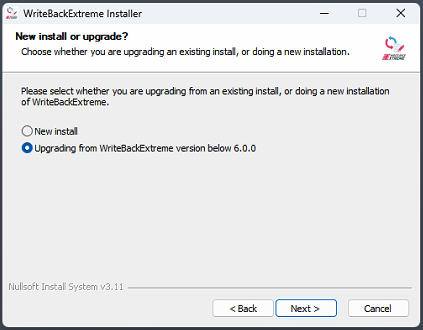
* At page 2 in the installer, select "Upgrading from WriteBackExtreme version below 6.0.0" and click Next.
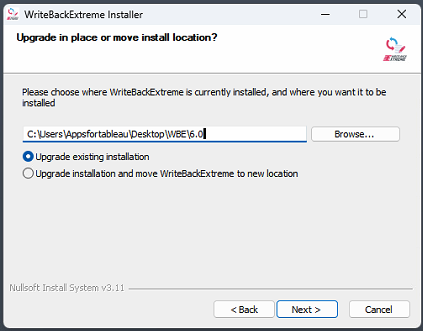
* At page 3 in the installer, choose the location where your current WriteBackExtreme.exe is located. From here on there are two possibilities:
* Upgrade current existing installation which installs WriteBackExtreme 6.x in the same directory it was before.
* Upgrade the existing installation and move to a new location. (Preferred!)
* When using this preferred option, the next page will display the location it wants to store WriteBackExtreme to. This location can be changed.
{% hint style="info" %}
To align to the preferred way of Windows, we recommend to use option 2 which installs it in a location that is preferred by Windows (Typically C:/Users/\/AppData/Local/WriteBackExtreme)
{% endhint %}
* After pressing Next at the last step, the installation will start. When this finishes, the option to register it as a service is displayed. Running it as a service is recommended.
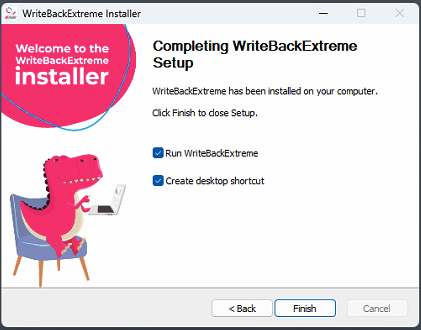
* After the setup is complete, this is shown:
{% endtab %}
{% tab title="Linux" %}
1. Extract the zip file you downloaded from our portal
2. Stop the service: `service WriteBackExtreme stop`
3. Check if is has successfully stopped: `services WriteBackExreme status`
4. Override the writebackextreme-amd64 binary at `/usr/local/share/writebackextreme`
5. Start the install command: `./writebackextreme-amd64 install --no-service`
6. Hit Ctrl+c to stop the installer
7. Start the service again: `service WriteBackExtreme start`
8. Verify that is has successfully started: `service WriteBackExtreme status`
{% endtab %}
{% tab title="Docker" %}
When running WriteBackExtreme in docker, nothing changes in the installation procedure.
{% endtab %}
{% endtabs %}
---
# Agent Instructions
This documentation is published with GitBook. GitBook is the documentation platform designed so that both humans and AI agents can read, navigate, and reason over technical content effectively. Learn more at gitbook.com.
## Querying This Documentation
If you need additional information that is not directly available in this page, you can query the documentation dynamically by asking a question.
Perform an HTTP GET request on the current page URL with the `ask` query parameter, and the optional `goal` query parameter:
```
GET https://docs.infotopics.com/trulyp/writebackextreme-old/getting-started/upgrade/upgrade-from-3.x-4.x-or-5.x-to-6.x.md?ask=&goal=
```
`ask` is the immediate question: it should be specific, self-contained, and written in natural language.
`goal` is optional and describes the broader end goal you are ultimately trying to accomplish on behalf of the user. GitBook uses it to tailor the answer towards what is most useful for that goal.
The response will contain a direct answer to the question and relevant excerpts and sources from the documentation.
Use this mechanism when the answer is not explicitly present in the current page, you need clarification or additional context, or you want to retrieve related documentation sections.