> For the complete documentation index, see [llms.txt](https://docs.infotopics.com/llms.txt). Markdown versions of documentation pages are available by appending `.md` to page URLs; this page is available as [Markdown](https://docs.infotopics.com/trulyp/analytics/managing-apps.md).
# Managing apps
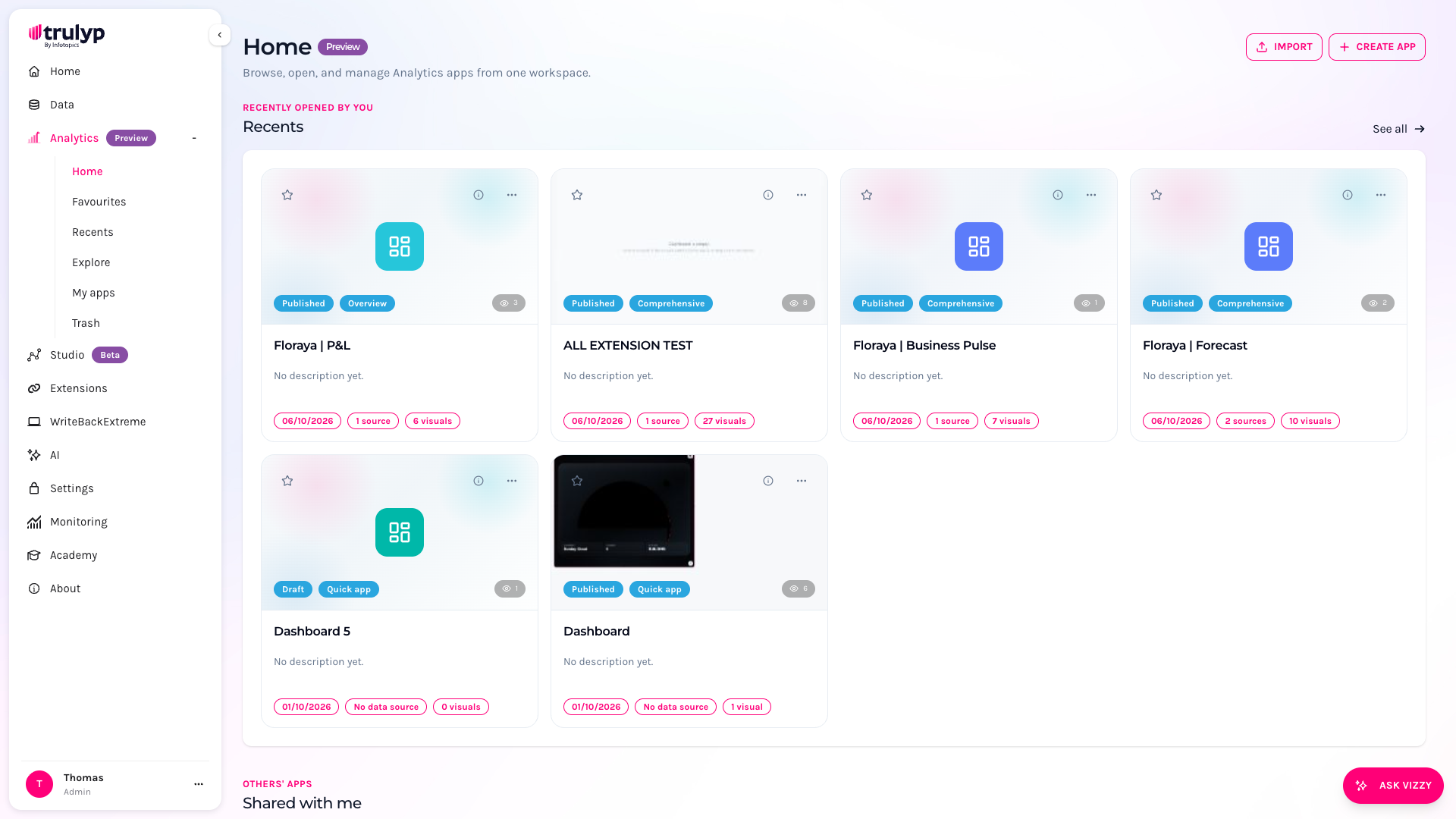
All your Analytics apps live under **Analytics** in the left-hand menu. From there you can open, favourite, export, import and remove apps, roll back to an earlier version, and recover apps from the trash.
The Analytics home page
### The Analytics menu
| Menu item | What it shows |
| -------------- | -------------------------------------------------------------------------------------------------------------------------------------------------------------------------- |
| **Home** | An overview with sections for **Favourites**, **Recents**, **Shared with me** and **My apps**. Each section shows up to six apps; click **See all** to open the full list. |
| **Favourites** | Every app you starred. |
| **Recents** | Apps you opened recently, newest first. |
| **Explore** | All apps you have access to, sorted from A to Z, with a search box. |
| **My apps** | A table of the apps you created, including their revision history. |
| **Trash** | Apps that were removed. You can restore them or delete them permanently. Only visible to Analytics Creators. |
The **Import** and **Create app** buttons at the top right of every page are only shown to users with the **Analytics Creator** role. See [Create your first app](/trulyp/analytics/create-an-app.md) to get started.
### App cards
On Home, Favourites, Recents and Explore, apps are shown as cards.
* **Thumbnail**: a preview of the app. The preview is updated each time someone clicks **Save** in the editor. Apps without a preview show a coloured icon.
* **Star**: click it to add the app to your favourites, or click again to remove it.
* **Status badge**: **Published** or **Draft**.
* **Size badge**: **Quick app** (up to 3 visuals), **Overview** (4 to 6 visuals) or **Comprehensive** (more than 6 visuals).
* **Eye icon**: how many times the app has been viewed.
* **Footer**: the date of the last change, the number of data sources and the number of visuals.
Click the name of an app to open it in view mode.
App info
More actions
* The **ⓘ** button shows details about the app: its author, who shared it, the number of views, visuals and data sources, and when it was last updated.
* The **…** button opens a menu with **Open**, **Export** and **Remove**. **Remove** is only available for apps you own (or for administrators) and moves the app to the trash.
### Explore: search all apps
**Explore** lists every app you can open. Type in **Search all apps...** to filter on name and description.
### My apps and revisions
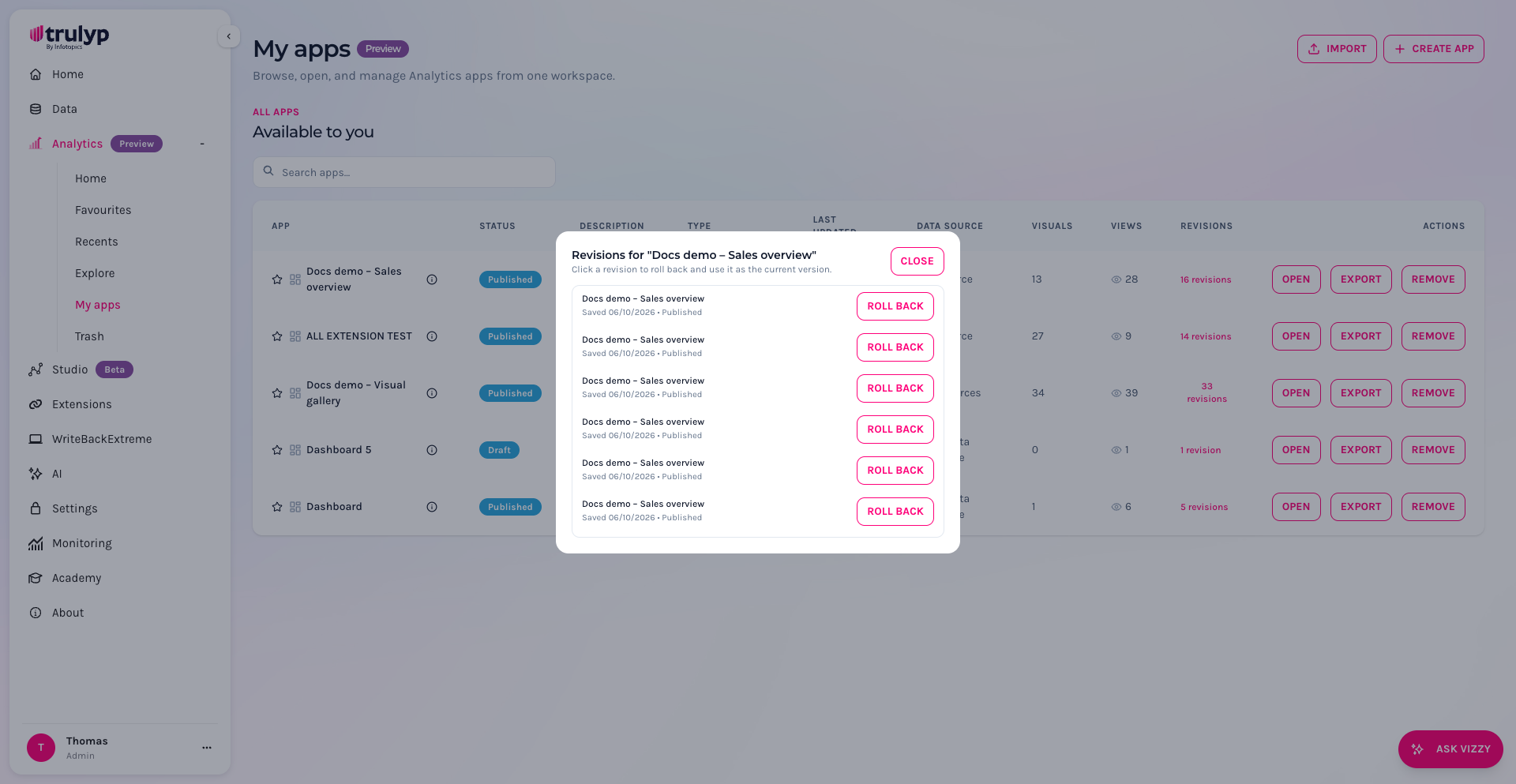
**My apps** shows the apps you created in a table with their status, type, last update, data sources, number of visuals, views and revisions. Use the buttons on each row to **Open**, **Export** or **Remove** an app.
Every time an app is saved, Trulyp keeps a revision. To go back to an earlier version:
1. Go to **My apps**.
2. In the **Revisions** column, click the **revisions** link of the app.
3. Find the version you want by its save date and click **Roll back**. That version becomes the current version of the app.
{% hint style="info" %}
Revisions are only available from the **My apps** table, so only for apps you own.
{% endhint %}
### Export and import apps
You can move an app to another Trulyp environment, for example from a test environment to production.
**Export**
Click **…** > **Export** on a card, or **Export** in the **My apps** table. Trulyp downloads a `.json` file with the app definition: its pages, visuals, settings, calculations and the names of the data sources it uses. The file does not contain your data.
**Import**
1. Click **Import** at the top right of any Analytics page.
2. Click **Choose export file** and select the `.json` file.
3. Optionally change the **name** of the imported app.
4. For every data source in the export, choose the matching data source (semantic model) in this environment.
5. Click **Import app**. The app opens in the editor.
{% hint style="warning" %}
Every data source used by the app must be mapped before you can import it. If the matching semantic model does not exist yet, [create it](/trulyp/data/semantic-modeling.md) first.
{% endhint %}
### Trash
When you remove an app, it moves to the **Trash**. From there you can:
* **Restore** the app, which brings it back to your app lists.
* **Delete permanently**, which removes the app for good. You are asked to confirm, because this cannot be undone.
Only the owner of an app or an administrator can remove or permanently delete it.
---
# Agent Instructions
This documentation is published with GitBook. GitBook is the documentation platform designed so that both humans and AI agents can read, navigate, and reason over technical content effectively. Learn more at gitbook.com.
## Querying This Documentation
If you need additional information that is not directly available in this page, you can query the documentation by asking a question.
Perform an HTTP GET request on the following URL with the `ask` and `goal` query parameters:
```
GET https://docs.infotopics.com/trulyp/analytics/managing-apps.md?ask=&goal=
```
`ask` is the immediate question: it should be specific, self-contained, and written in natural language.
`goal` is what the user is ultimately trying to achieve, the reason they need the answer. Sharing it helps GitBook give you a better, more relevant answer. A goal is most helpful when it describes the outcome the user wants rather than restating the question. For example, with `ask=how do I create an API token`, a goal like `automate deployments from our CI pipeline` lets GitBook tailor the answer to that use case.
The response will contain a direct answer to the question and relevant excerpts and sources from the documentation.
Use this mechanism when the answer is not explicitly present in the current page, you need clarification or additional context, or you want to retrieve related documentation sections.