> For the complete documentation index, see [llms.txt](https://docs.infotopics.com/llms.txt). Markdown versions of documentation pages are available by appending `.md` to page URLs; this page is available as [Markdown](https://docs.infotopics.com/supertables/configuration/configuration-screen/appearance-tab/layout-options.md).
# Layout Options
### Enable auto row height based on the contents of the cells
The height of each cell will change automatically based on the contents of the cell to show all content in the view. The row height will be calculated on the cell containing the most content (either image, text or numbers).
### Enable word wrapping
Allows long text inside cells to wrap onto multiple lines instead of being cut off or shown on one line.\
This option is available when **Enable auto row height based on the contents of the cells** is disabled.
### Row height in pixels
Set a fixed row height for the table.\
This option is available when **Enable auto row height based on the contents of the cells** is disabled.
### Vertical alignment
Choose how content is vertically aligned inside the cells.\
This helps keep the table visually consistent, especially when using custom row heights or auto row height.
### Enable sidebar
Enable the option to show or hide the sidebar in the SuperTables extension for Dashboard users. You can also individually set this option for only the
* Columns panel
* Filter panel
* Formulas panel
* [InputTables panel](https://docs.infotopics.com/inputtables/)
* [AI panel](/supertables/configuration/configuration-screen/ai.md)
### Enable status bar
This option lets you toggle the visibility of the status bar in your SuperTable. The status bar is shown in SuperTables at the bottom and holds information on the total number of rows and filtered rows.
### Always show sorting icon on all header names
Keep the ‘sorting’ icon in the header at all times when enabling this. This will show less experienced users how easy it can be to sort on each header.
### Hide Index column in the columns side panel
Enable to hide the index column in the SuperTables instance. This will prevent it from showing up in the “columns” tab of your end-users.
### Enable auto aggregation based on the visible columns in the table V2
{% hint style="info" %}
This is a **Tableau** only feature.
{% endhint %}
[Dynamic Aggregation](/supertables/features/dynamic-aggregation.md)
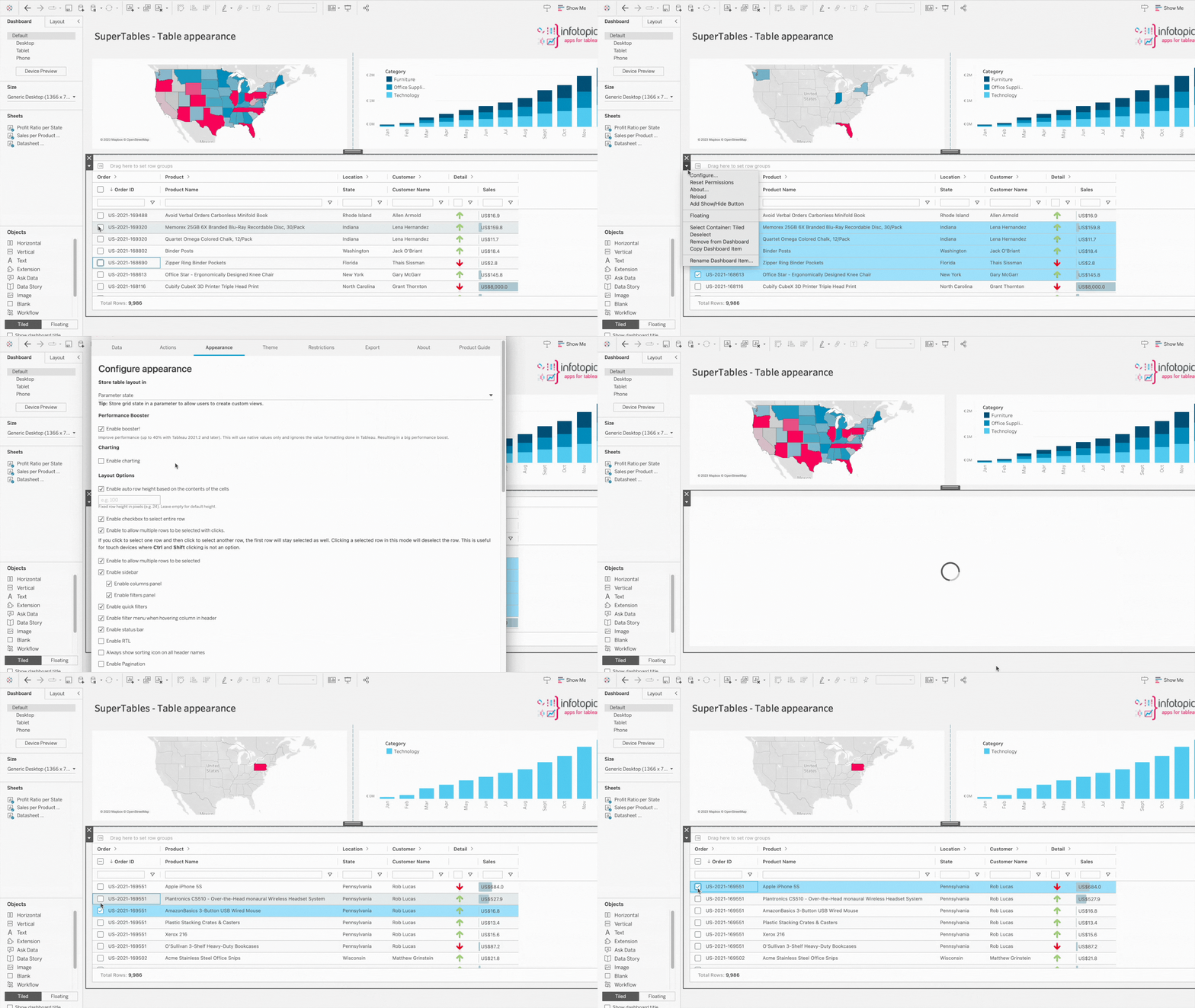
### Enable checkbox to select entire row
Adds a checkbox that allows users to select an entire row.\
This is useful when users need a clear visual way to select records in the table.
### Enable to allow multiple rows to be selected with clicks
When using devices where Ctrl and Shift is not an option, turn on this feature where each click of a row will keep all rows selected. Clicking on a selected cell will deselect the row.
### Enable allow multiple rows to be selected
When selected, users can highlight multiple rows; when disabled, only a single row can be selected. Each selection of a new row will deselect the previous selection.
### Show button to clear all filters
Shows a button that allows users to clear all filters applied in SuperTables. Can be positioned on the top or bottom right corner.
### Enable advance inline filter
Enables advanced inline filtering directly in the table.\
This gives users more filtering options inside the column headers.
### Enable context menu in column header
When this option is enabled, a three-dot menu appears next to each column name in the header. From this menu, users can pin columns, sort ascending or descending, autosize columns, fit columns to the window, group data, choose visible columns, and expand or collapse grouped rows. This gives more flexibility while keeping the table easy to navigate.
### Enable RTL (Right to Left) layout
RTL stands for ‘Right To Left’. This gives the SuperTable users the option to rearrange their SuperTable, as it reads from right to left of the screen.
### Enable Pagination
Show pagination at the footer of your SuperTable. You can click through each page or use it to go to the last.
### Show SuperTables in a pop-up on mark selection
{% hint style="info" %}
This is a **Tableau-only** feature.
{% endhint %}
**Important**: Reload the extension after changing the pop-up settings. Choose which worksheet to trigger the pop-up. This will turn the SuperTable into a dashboard button to save that vital dashboard space and will be triggered on mark selection. Allow the pop-up only when the datasheet has data (has a negative performance impact).
---
# Agent Instructions
This documentation is published with GitBook. GitBook is the documentation platform designed so that both humans and AI agents can read, navigate, and reason over technical content effectively. Learn more at gitbook.com.
## Querying This Documentation
If you need additional information that is not directly available in this page, you can query the documentation by asking a question.
Perform an HTTP GET request on the following URL with the `ask` and `goal` query parameters:
```
GET https://docs.infotopics.com/supertables/configuration/configuration-screen/appearance-tab/layout-options.md?ask=&goal=
```
`ask` is the immediate question: it should be specific, self-contained, and written in natural language.
`goal` is what the user is ultimately trying to achieve, the reason they need the answer. Sharing it helps GitBook give you a better, more relevant answer. A goal is most helpful when it describes the outcome the user wants rather than restating the question. For example, with `ask=how do I create an API token`, a goal like `automate deployments from our CI pipeline` lets GitBook tailor the answer to that use case.
The response will contain a direct answer to the question and relevant excerpts and sources from the documentation.
Use this mechanism when the answer is not explicitly present in the current page, you need clarification or additional context, or you want to retrieve related documentation sections.