> For the complete documentation index, see [llms.txt](https://docs.infotopics.com/llms.txt). Markdown versions of documentation pages are available by appending `.md` to page URLs; this page is available as [Markdown](https://docs.infotopics.com/showmemore/features/source-target-sankey-diagram/text-formatting/labels.md).
# Labels
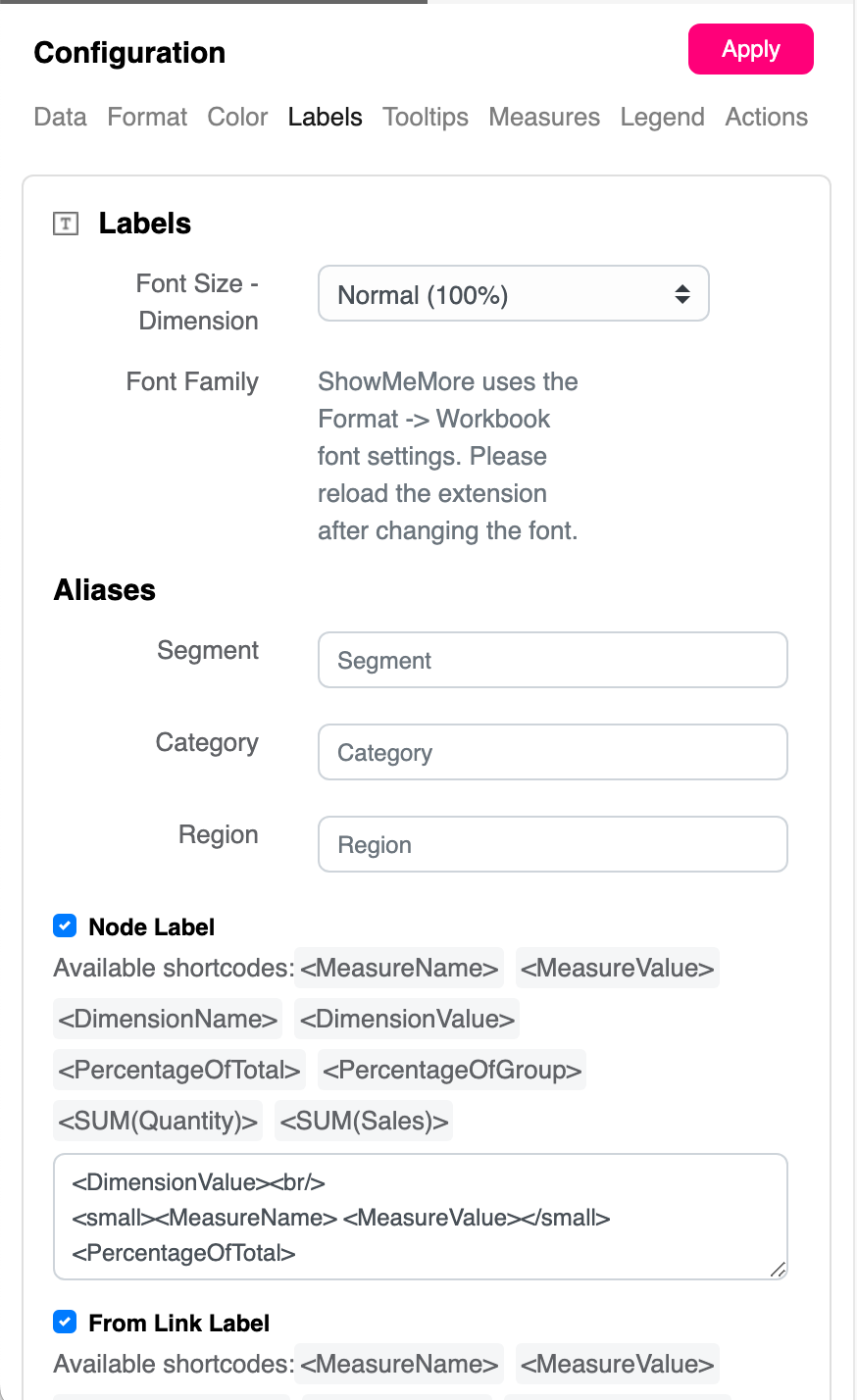
## Labels formatting
Part of Source Target Sankey configuration panel -> Labels
### Format options
{% tabs %}
{% tab title="Font Size" %}
You can change the size of the font from 50% to 150% using the dropdown menu. Changing the font size will affect all fonts within your Sankey Diagram.
{% endtab %}
{% tab %}
Please refer to
{% endtab %}
{% tab title="Header Aliases" %}
If you enable the headers under the "Format" tab, you can display the names of dimensions used in your Sankey Diagrams. Once enabled, you can use header aliases to change the names of dimensions displayed above the Sankey Nodes.
{% endtab %}
{% endtabs %}
## Label customization
Sankey diagrams provide a feature that allows users to customize the labels according to their specific needs. The content of these labels can be configured using HTML format, which enables a wide range of customization options. Additionally, users have the convenience of using short codes such as `` to dynamically insert the dimension name into the labels. This level of flexibility ensures that the labels can be tailored to convey the exact information required, enhancing the readability and effectiveness of the Sankey diagram in representing data flows and relationships.
#### Example
Here is an example of how you can customize a label using HTML format and a short code:
```html
```
In this example, the dimension name will be displayed in bold blue text within the Sankey diagram label.
Example of customizing labels
{% tabs %}
{% tab title="Node label" %}
Within the text box, enter the desired content for your node labels. Use the appropriate formatting to ensure an optimal appearance in your Sankey Diagram. Refer to the tips above.. Refer to the tips above.
{% endtab %}
{% tab title="From link label" %}
Next to each of your node labels, you will be able to display a label which can be entered within the text box. An example would to show the percentage of target. Example.
{% endtab %}
{% tab title="To link label" %}
Have a label shown before your node labels. This could be useful to show a percent of your target. Use the text box to enter your information and see an animated gif on how this will look when displayed.
{% endtab %}
{% endtabs %}
---
# Agent Instructions
This documentation is published with GitBook. GitBook is the documentation platform designed so that both humans and AI agents can read, navigate, and reason over technical content effectively. Learn more at gitbook.com.
## Querying This Documentation
If you need additional information that is not directly available in this page, you can query the documentation by asking a question.
Perform an HTTP GET request on the following URL with the `ask` and `goal` query parameters:
```
GET https://docs.infotopics.com/showmemore/features/source-target-sankey-diagram/text-formatting/labels.md?ask=&goal=
```
`ask` is the immediate question: it should be specific, self-contained, and written in natural language.
`goal` is what the user is ultimately trying to achieve, the reason they need the answer. Sharing it helps GitBook give you a better, more relevant answer. A goal is most helpful when it describes the outcome the user wants rather than restating the question. For example, with `ask=how do I create an API token`, a goal like `automate deployments from our CI pipeline` lets GitBook tailor the answer to that use case.
The response will contain a direct answer to the question and relevant excerpts and sources from the documentation.
Use this mechanism when the answer is not explicitly present in the current page, you need clarification or additional context, or you want to retrieve related documentation sections.