> For the complete documentation index, see [llms.txt](https://docs.infotopics.com/llms.txt). Markdown versions of documentation pages are available by appending `.md` to page URLs; this page is available as [Markdown](https://docs.infotopics.com/processmining/getting-started/preparing-your-data.md).
# Preparing your data
To get the best value from the Process Mining extension preparing your data correctly is not difficult, but it is important. To get started with the ProcessMining extension, you just connect your Tableau Desktop to a datasource containing your process event logs. These log files must contain:
* A Case identifier that identifies each unique case flowing through your process.
* An activity identifier (or “Process step”) that will be shown as the nodes in your process map
* A start Date/Timestamp
* An end Date/Timestamp (not required but really helpful)
You don’t need any measures or calculations, the most relevant process KPI’s are automatically calculated within the extension. With these 4 dimensions create a separate ‘datasheet’. It is best practice to not connect your extension to an existing visualization, use a dedicated ‘datasheet’ instead. Using a dedicated ‘datasheet’ for your ProcessMining extension will result in better performing dashboards and increased interactivity.
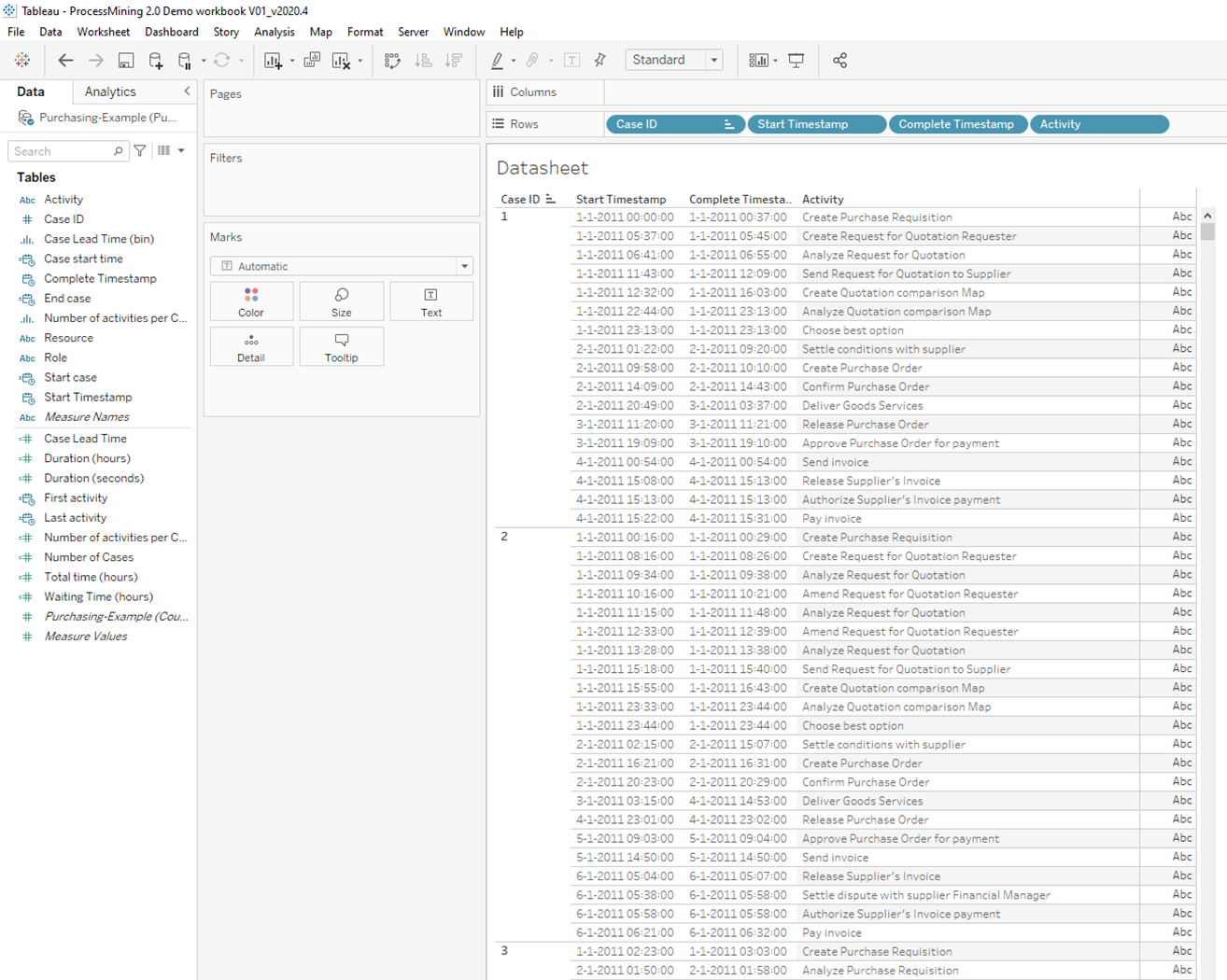
Creating the ‘datasheet’ is a straight forward procedure. Just drag the dimensions to the rows. Make sure your “Start” and “End” Date/Timestamps are of datatype date/time, are set to exact date and are presented as discrete values. It is recommended to use the order represented in the screenshot below.
Make sure you do a nested sort of your Case ID (and the next dimensions) on the minimum of the “Start” Date/Timestamp. This will make sure that your activities are sorted in a chronological way. The content of the ‘datasheet’ should look something like the screenshot below:
---
# Agent Instructions
This documentation is published with GitBook. GitBook is the documentation platform designed so that both humans and AI agents can read, navigate, and reason over technical content effectively. Learn more at gitbook.com.
## Querying This Documentation
If you need additional information that is not directly available in this page, you can query the documentation dynamically by asking a question.
Perform an HTTP GET request on the current page URL with the `ask` query parameter, and the optional `goal` query parameter:
```
GET https://docs.infotopics.com/processmining/getting-started/preparing-your-data.md?ask=&goal=
```
`ask` is the immediate question: it should be specific, self-contained, and written in natural language.
`goal` is optional and describes the broader end goal you are ultimately trying to accomplish on behalf of the user. GitBook uses it to tailor the answer towards what is most useful for that goal.
The response will contain a direct answer to the question and relevant excerpts and sources from the documentation.
Use this mechanism when the answer is not explicitly present in the current page, you need clarification or additional context, or you want to retrieve related documentation sections.