> For the complete documentation index, see [llms.txt](https://docs.infotopics.com/llms.txt). Markdown versions of documentation pages are available by appending `.md` to page URLs; this page is available as [Markdown](https://docs.infotopics.com/processmining/configuration/configure-the-processmining-extension/detail-slider.md).
# Detail slider
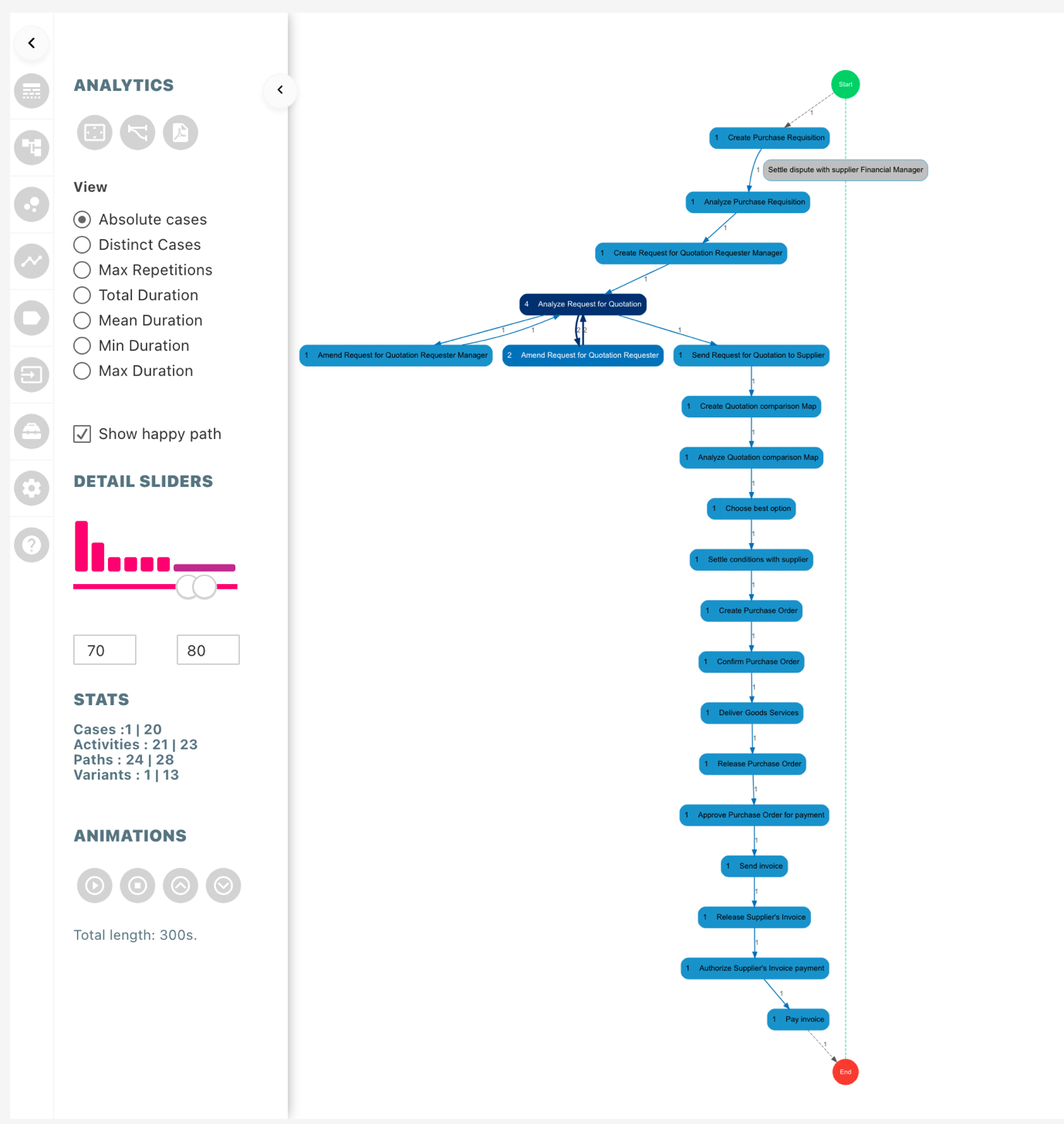
Detail slider, based on variants, allows the user to understand the flow of the process better. It lets the user focus on the most occurring or least occurring processes to understand and optimize the process flow. The histogram associated with the slider represents the overall distribution of variants, height of the bar represents the total number cases in the respective bucket. The distribution is based on buckets (for example if there are 100 cases then first 10 cases will be in the first bin). The text boxes below the histogram can be used to manually enter the range the user wants to focus on.
The variant slider can also be used as a filter to change the focus of your whole dashboard to variants in selected range. The configuration is the same as the variant filter available in dashboard actions pane. The same configuration responds to the filter in variants pane.
#### Stats
Content of the stats section represents what is shown in the process map, the values represent\
“current count | total count”.
#### Happy paths with detail slider
While moving the detail slider, if the nodes configured in the happy path is not available in the filtered path, then the nodes in the happy path will change color to grey without any value associated to it. In this way it is easy to analyze the process map and check if certain process skip important steps or following the structure.
---
# Agent Instructions
This documentation is published with GitBook. GitBook is the documentation platform designed so that both humans and AI agents can read, navigate, and reason over technical content effectively. Learn more at gitbook.com.
## Querying This Documentation
If you need additional information that is not directly available in this page, you can query the documentation dynamically by asking a question.
Perform an HTTP GET request on the current page URL with the `ask` query parameter, and the optional `goal` query parameter:
```
GET https://docs.infotopics.com/processmining/configuration/configure-the-processmining-extension/detail-slider.md?ask=&goal=
```
`ask` is the immediate question: it should be specific, self-contained, and written in natural language.
`goal` is optional and describes the broader end goal you are ultimately trying to accomplish on behalf of the user. GitBook uses it to tailor the answer towards what is most useful for that goal.
The response will contain a direct answer to the question and relevant excerpts and sources from the documentation.
Use this mechanism when the answer is not explicitly present in the current page, you need clarification or additional context, or you want to retrieve related documentation sections.