> For the complete documentation index, see [llms.txt](https://docs.infotopics.com/llms.txt). Markdown versions of documentation pages are available by appending `.md` to page URLs; this page is available as [Markdown](https://docs.infotopics.com/processmining/configuration/configure-the-processmining-extension/connect-the-datasheet-and-configure-the-paths.md).
# Connect the datasheet and configure the paths
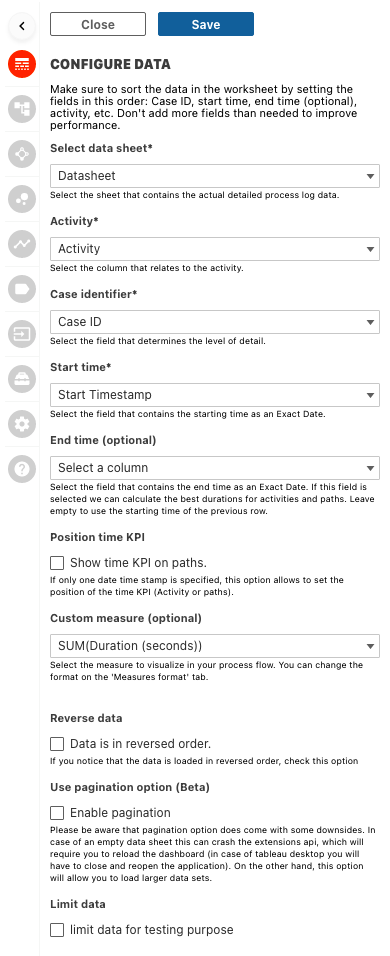
Use the “PATHS DATA” tab to connect to your datasheet and configure the behaviour and look-and-feel of all paths in you Process Mining extension.
#### Select paths data
This is where you select the sheet that holds your data, also referred to as the ‘datasheet’
Once you selected the ‘datasheet’ the rest of the fields will be populated with all the available fields of that sheet. So next option to configure is the “Activity” field.
#### Activity
The activities in your process are what will be shown on as nodes in your process map, they are the events of the process. This is where you will be able to see where the real bottlenecks are in your organisation, which events are taking too much time and which are taking the happy paths. ProcessMining will clearly show which activities need more attention than others.
#### Case identifier
Choose which column holds the unique identifier of the cases flowing through your process. Each case will have a complete flow of the activities and time taken. Use dashboard actions for example to link to a sheet on your dashboard to see the flow of each individual case within the extension.
#### Start time
Select the Date/Timestamp from your ‘datasheet’ that represents the start of an activity. As stated before the best way to store your dates is in a discrete “exact date” value.
#### End time (optional)
Select the field that contains the end Date/Timestamp on your ‘datasheet’. This field is not a required field to operate the ProcessMining extension but enables you to calculate the ‘Waiting time’ it takes for cases to move from one activity to another (so the time between the end of axtivity X and the start of activity X+1)
#### Position of time KPI
If only one date time stamp is specified, this option allows for the configuration of the time KPI. By default, time between start dates will be displayed on the activities. But by checking this box, they will be displayed on the paths instead.
#### Custom measure
When the default KPI’s / measures in the ProcessMining extension are not sufficient for your use case you can also add an extra custom measure to your ‘datasheet’ and select it in this field to be part of your ProcessMining analytics.
#### Reverse data
If the sorting in your ‘datasheet’ is not as expected but it seems to be in reversed order, this switch can easily help you out in reversing the order of your activities.
#### Pagination
Enabling pagination will set your data to load in chunks (or “pages). This enables use-cases with large numbers of rows.
#### Limit data
When configuring or changing the extension, limiting data will improve performance. This allows users to quickly have their changes reflected in the visualisation.
---
# Agent Instructions
This documentation is published with GitBook. GitBook is the documentation platform designed so that both humans and AI agents can read, navigate, and reason over technical content effectively. Learn more at gitbook.com.
## Querying This Documentation
If you need additional information that is not directly available in this page, you can query the documentation dynamically by asking a question.
Perform an HTTP GET request on the current page URL with the `ask` query parameter, and the optional `goal` query parameter:
```
GET https://docs.infotopics.com/processmining/configuration/configure-the-processmining-extension/connect-the-datasheet-and-configure-the-paths.md?ask=&goal=
```
`ask` is the immediate question: it should be specific, self-contained, and written in natural language.
`goal` is optional and describes the broader end goal you are ultimately trying to accomplish on behalf of the user. GitBook uses it to tailor the answer towards what is most useful for that goal.
The response will contain a direct answer to the question and relevant excerpts and sources from the documentation.
Use this mechanism when the answer is not explicitly present in the current page, you need clarification or additional context, or you want to retrieve related documentation sections.