> For the complete documentation index, see [llms.txt](https://docs.infotopics.com/llms.txt). Markdown versions of documentation pages are available by appending `.md` to page URLs; this page is available as [Markdown](https://docs.infotopics.com/mailscheduler/getting-started/setup/url-and-ssl-certificate.md).
# URL & SSL Certificate
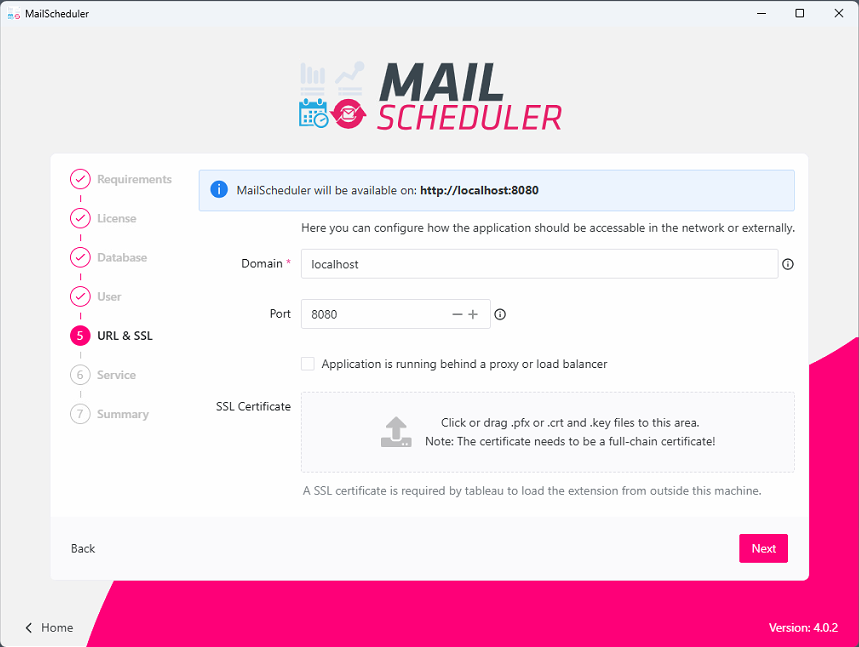
The final step is the configuration of the domain the application will be running on. There are 2 possible setups:
* [The application is running behind a reverse-proxy or load-balancer](#configured-behind-reverse-proxy-load-balancer)
* [The application is exposed to the internet](#configured-with-direct-access-from-the-internet)
### Configured with direct access from the Internet
This indicates that the application or server is not functioning behind a reverse proxy or load balancer.
{% hint style="info" %}
The protocol (e.g. `http://` or `https://`) should be omitted in the domain field.
{% endhint %}
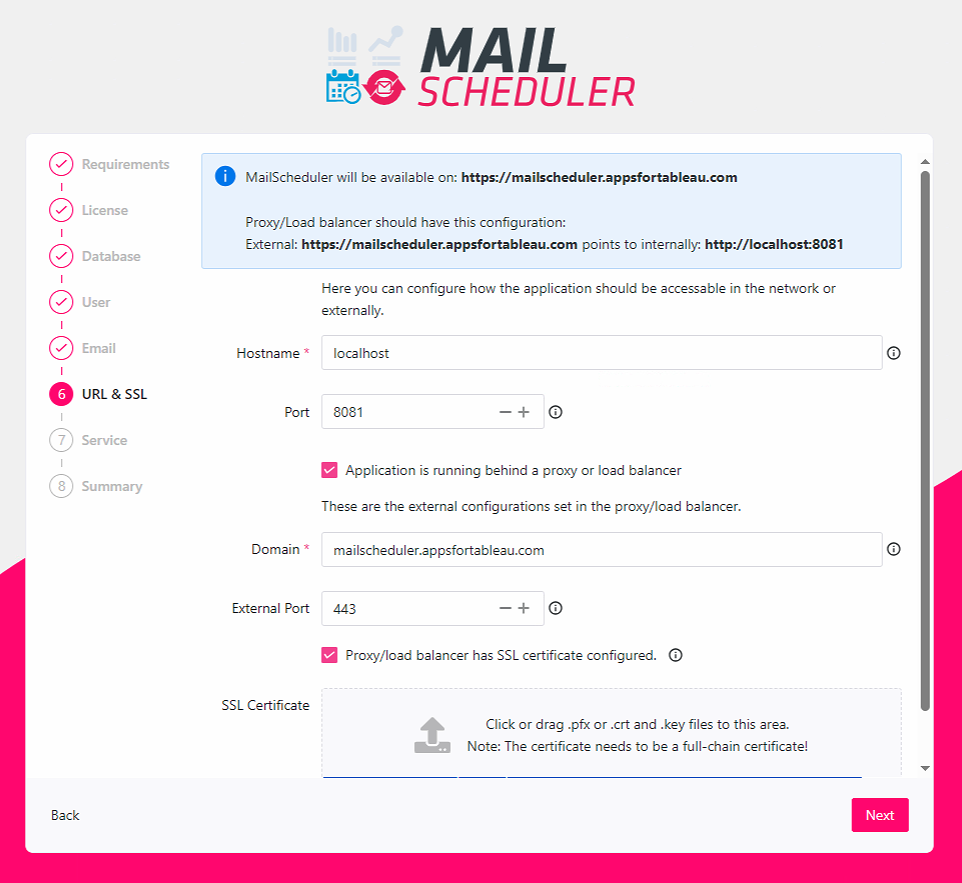
### Configured behind Reverse Proxy/Load Balancer
Setting up a reverse proxy can be done by checking `Application is running behind a load balancer` option. The message on the top indicates how it should be configured at the load balancer side.
{% hint style="info" %}
The protocol (e.g. `http://` or `https://`) should be omitted in the domain and hostname field.
{% endhint %}
### Troubleshooting SSL Certifications
Sometimes the application does not like the provided ssl certificates. These error could occur:
Failed to decode PEM block containing private key
1. Open keyfile and check if it starts with -----BEGIN PRIVATE KEY-----
If there is something above this line, delete it. (Same applies to certificates!)
2. Open your keyfile and check if it is encrypted. (Encrypted private keys start with -----BEGIN ENCRYPTED PRIVATE KEY-----) When it is encrypted, you need to decrypt it. You can do that via openssl (if installed on your machine) in your terminal using the following command:
`openssl rsa -in -out `
#### Server startup problems
Could not startup server, Contact Apps For Tableau support when the problem persists
The app server is unable to start. This can have multiple causes like:
* Application is configured as administrator but is currently not running with administrator previleges.
* Check if there is no other MailScheduler proces running in the background. Open Task manager and select the `Details` tab. You should have only one process called MailScheduler.
* Check if there is no other process running on the port that is configured in MailScheduler. You can do that with this command in cmd:
```
netstat -aon
```
* Check is the application log. This log file is located at \/.app-runtime/storage/logs/go-application.log
* Open powershell and navigate to the directory where MailScheduler.exe is located. run this command to manually trigger the application server:
```
./MailScheduler.exe serve
```
This command might give more details about what went wrong. If you need more help, you can contact our support.
listen tcp :443: bind: Only one usage of each socket address (protocol/network address/port) is normally permitted
When this error appears in your go-application.log it is not able to spin the server because the port you have configured is already in use by another program.
---
# Agent Instructions
This documentation is published with GitBook. GitBook is the documentation platform designed so that both humans and AI agents can read, navigate, and reason over technical content effectively. Learn more at gitbook.com.
## Querying This Documentation
If you need additional information that is not directly available in this page, you can query the documentation by asking a question.
Perform an HTTP GET request on the following URL with the `ask` and `goal` query parameters:
```
GET https://docs.infotopics.com/mailscheduler/getting-started/setup/url-and-ssl-certificate.md?ask=&goal=
```
`ask` is the immediate question: it should be specific, self-contained, and written in natural language.
`goal` is what the user is ultimately trying to achieve, the reason they need the answer. Sharing it helps GitBook give you a better, more relevant answer. A goal is most helpful when it describes the outcome the user wants rather than restating the question. For example, with `ask=how do I create an API token`, a goal like `automate deployments from our CI pipeline` lets GitBook tailor the answer to that use case.
The response will contain a direct answer to the question and relevant excerpts and sources from the documentation.
Use this mechanism when the answer is not explicitly present in the current page, you need clarification or additional context, or you want to retrieve related documentation sections.