> For the complete documentation index, see [llms.txt](https://docs.infotopics.com/llms.txt). Markdown versions of documentation pages are available by appending `.md` to page URLs; this page is available as [Markdown](https://docs.infotopics.com/inputtables/support/faq.md).
# FAQ
Here is a list of frequently asked questions.
Does InputTables overwrite my existing data?
No, we do not touch your existing data. All the edits are safely stored in a separate table. When you (re)open SuperTables, it will connect to this table and join the data to your existing data.
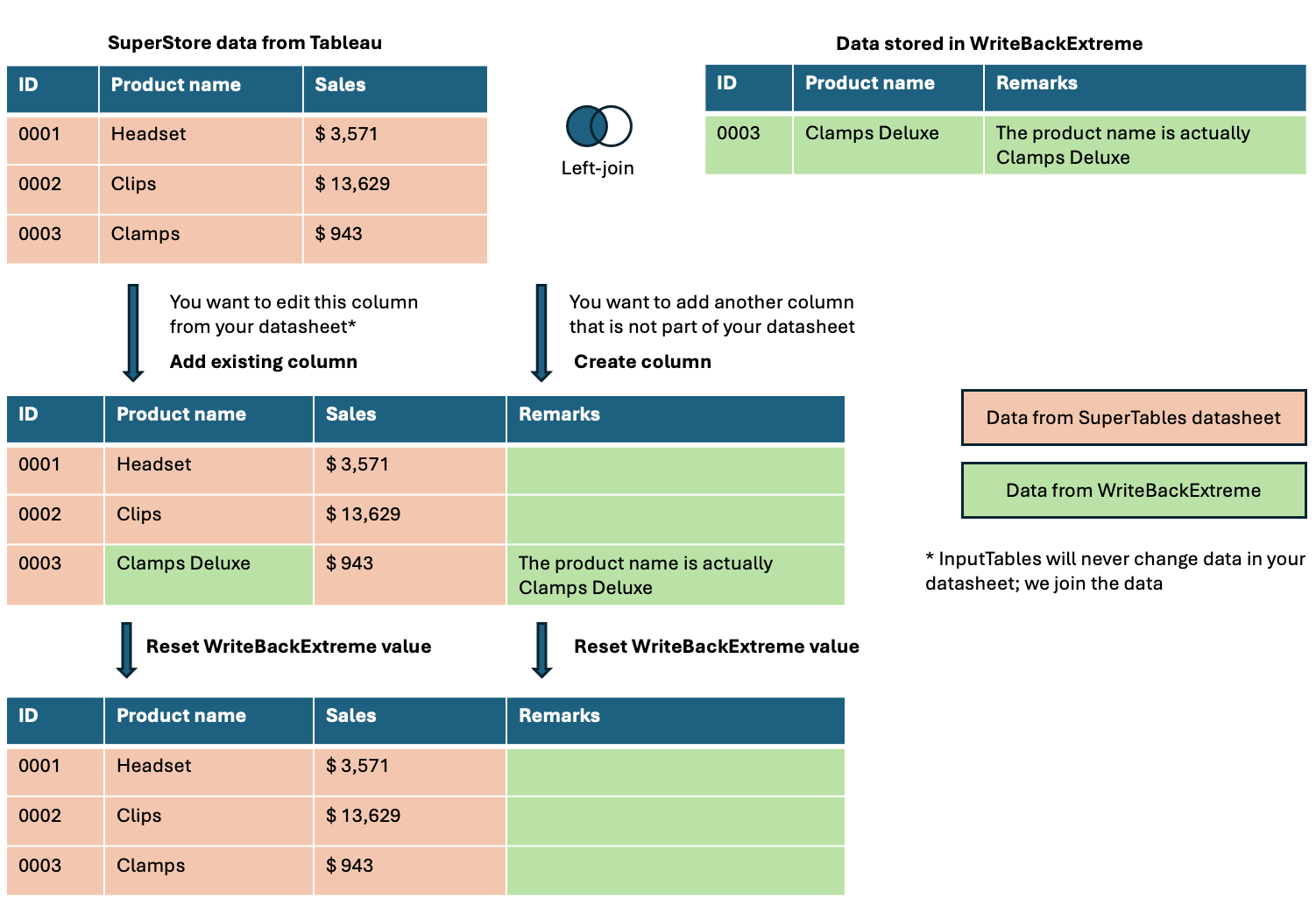
Can I re-use my edited data in other Tableau charts?
Yes! You are free to join the WriteBackExtreme table back to your primary datasource and use the values from WriteBackExtreme in your charts.
Can I comment in pivot mode on a group of rows?
No. It is only possible to comment on a single cell.
I click the comment or audit card in the side panel, but an incorrect cell highlights.
Likely, your primary key is not unique. Make sure that when you create a schema you do not see the warning "Your primary key is not unique".
Can I change my primary key for the schema?
No you cannot change your primary key. If you would change your primary key that will result in many orphan records. We recommend creating a new schema with the correct primary key.
"Unable to reach WriteBackExtreme at this URL” when configuring InputTables in SuperTables
#### **Symptom**
When configuring **InputTables inside SuperTables**, the following error is shown after entering the WriteBackExtreme URL:
> **“Unable to reach WriteBackExtreme at this URL. Check that the server is online, configured for this address, and accessible from this environment.”**
This may occur even though:
* The WriteBackExtreme URL opens successfully in a browser
* The backend service is running and reachable on the network
As a result, the InputTables login screen does not appear and the integration cannot be completed.
***
#### **Cause**
This issue is caused by **browser-enforced Local Network Access restrictions** introduced in modern browsers (for example **Chrome 142+**).
When InputTables is used inside SuperTables:
* The extension runs in the browser context
* If the **extension is loaded from a public domain** (e.g. Tableau Cloud or a SaaS-hosted extension)
* And the **WriteBackExtreme backend resolves to a private/on-prem network address**
…the browser will **block the request before it reaches the server**, even if the URL is reachable directly in a browser tab.
This is a **security restriction enforced by the browser**, not a connectivity or configuration issue in InputTables or WriteBackExtreme.
***
#### **Resolution**
To resolve this issue, both the extension and backend must be hosted in the **same network context**:
✅ **Recommended**
* Use **on-prem hosting for both SuperTables/InputTables and WriteBackExtreme**
✅ **Alternative**
* Use a **fully public / SaaS setup** for both the extension and the backend
❌ **Not supported**
* Using a **public domain extension** with an **on-prem/private WriteBackExtreme backend**
There is **no supported workaround** within the browser, SuperTables, or InputTables for this scenario.
---
# Agent Instructions
This documentation is published with GitBook. GitBook is the documentation platform designed so that both humans and AI agents can read, navigate, and reason over technical content effectively. Learn more at gitbook.com.
## Querying This Documentation
If you need additional information that is not directly available in this page, you can query the documentation by asking a question.
Perform an HTTP GET request on the following URL with the `ask` and `goal` query parameters:
```
GET https://docs.infotopics.com/inputtables/support/faq.md?ask=&goal=
```
`ask` is the immediate question: it should be specific, self-contained, and written in natural language.
`goal` is what the user is ultimately trying to achieve, the reason they need the answer. Sharing it helps GitBook give you a better, more relevant answer. A goal is most helpful when it describes the outcome the user wants rather than restating the question. For example, with `ask=how do I create an API token`, a goal like `automate deployments from our CI pipeline` lets GitBook tailor the answer to that use case.
The response will contain a direct answer to the question and relevant excerpts and sources from the documentation.
Use this mechanism when the answer is not explicitly present in the current page, you need clarification or additional context, or you want to retrieve related documentation sections.