> For the complete documentation index, see [llms.txt](https://docs.infotopics.com/llms.txt). Markdown versions of documentation pages are available by appending `.md` to page URLs; this page is available as [Markdown](https://docs.infotopics.com/getting-started/setup/repository-database/sql-server.md).
# SQL server
SQL Server **2016 or later** can serve as the repository database. WriteBackExtreme connects through ODBC Driver 18 for SQL Server.
Fill in:
1. **Database host**
2. **Database port** — `1433` by default
3. **Database name**
4. **Database username**
5. **Database password**
{% hint style="warning" %}
Use a **SQL Server account**, not a Windows-authenticated (AD) account. The wizard requires a username and a password; you cannot leave them empty to have the application connect as the service account.
{% endhint %}
Connecting to a named instance? Write the host as `machine01\instance`.
{% hint style="danger" %}
Password **cannot** contain `$` signs.
{% endhint %}
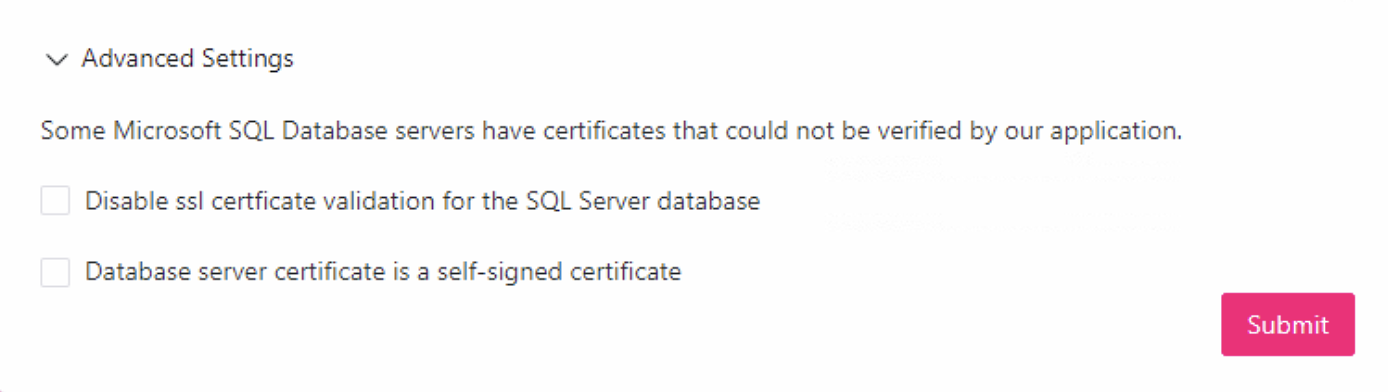
### Advanced Settings
Some Microsoft SQL Server machines present a certificate that WriteBackExtreme cannot verify. Expand **Advanced Settings** to deal with that:
* **SQL Server database uses SSL encryption** — tick this when the server requires an encrypted connection.
* **Disable ssl certficate validation for the SQL Server database** — tick this to accept the certificate without validating it, for example a self-signed certificate.
{% hint style="info" %}
Turning off certificate validation is a last resort. Prefer importing the authority certificate on the machine that runs WriteBackExtreme, as described below.
{% endhint %}
SQLSTATE[08001]: SSL Provider: The certificate chain was issued by an authority that is not trusted
**Symptoms**
During installation or configuration, the extension cannot establish a database connection.\
Error messages may mention SSL/TLS, certificate trust, or “the certificate chain was issued by an authority that is not trusted.”
* Error message example:
```
SQLSTATE[08001]: [Microsoft][ODBC Driver 18 for SQL Server]SSL Provider:
The certificate chain was issued by an authority that is not trusted.
```
**Cause**\
The SQL Server requires SSL encryption, but the certificate presented cannot be validated. This usually happens when:
* A self-signed certificate is being used, and the authority certificate is not trusted on the machine running WBE.
* The full certificate chain (including intermediates) is not installed.
**Solution**
1. If possible, install a certificate signed by a trusted Certificate Authority (CA).
2. If using a self-signed certificate, import the authority certificate into the **Trusted Root Certification Authorities** store on the server where WBE runs.
3. If the issue persists during installation, try the following steps:
* Stop the WriteBackExtreme service.
* Delete the **runtime** and **config** folders to reset the installation.
* Restart the installation and re-enter database details.
* Tick **Disable SSL certificate validation for the SQL Server database** to bypass the validation check.
---
# Agent Instructions
This documentation is published with GitBook. GitBook is the documentation platform designed so that both humans and AI agents can read, navigate, and reason over technical content effectively. Learn more at gitbook.com.
## Querying This Documentation
If you need additional information that is not directly available in this page, you can query the documentation by asking a question.
Perform an HTTP GET request on the following URL with the `ask` and `goal` query parameters:
```
GET https://docs.infotopics.com/getting-started/setup/repository-database/sql-server.md?ask=&goal=
```
`ask` is the immediate question: it should be specific, self-contained, and written in natural language.
`goal` is what the user is ultimately trying to achieve, the reason they need the answer. Sharing it helps GitBook give you a better, more relevant answer. A goal is most helpful when it describes the outcome the user wants rather than restating the question. For example, with `ask=how do I create an API token`, a goal like `automate deployments from our CI pipeline` lets GitBook tailor the answer to that use case.
The response will contain a direct answer to the question and relevant excerpts and sources from the documentation.
Use this mechanism when the answer is not explicitly present in the current page, you need clarification or additional context, or you want to retrieve related documentation sections.
