# General formatting and styling

## General&#x20;

<figure><img src="https://3696064508-files.gitbook.io/~/files/v0/b/gitbook-x-prod.appspot.com/o/spaces%2Ffen81laUQFBf286HYARr%2Fuploads%2FKxd95a3y1PW8g59Ixkgw%2Fimage.png?alt=media&#x26;token=b01d2583-a801-44ea-b1d8-385de477a18a" alt=""><figcaption></figcaption></figure>

<table><thead><tr><th width="194">Setting</th><th>Description</th></tr></thead><tbody><tr><td>Layout mode</td><td>You can choose between a centered or top layout mode. The top layout mode positions the diagram towards the top of the window.</td></tr><tr><td>Sort field type</td><td>You can choose the sort type between value or name for either an alphabetic or numeric sort.</td></tr><tr><td>Sort on value</td><td>You can define the sort order here</td></tr><tr><td>Background</td><td>Pick a background color for the visualization canvas.</td></tr></tbody></table>

## Nodes

<figure><img src="https://3696064508-files.gitbook.io/~/files/v0/b/gitbook-x-prod.appspot.com/o/spaces%2Ffen81laUQFBf286HYARr%2Fuploads%2FM6RjAwcbamidBEDAOI0u%2Fimage.png?alt=media&#x26;token=76f89d19-eac1-4c32-a01b-235c18ffdc78" alt=""><figcaption></figcaption></figure>

| Setting             | Description                                                                                                                          |
| ------------------- | ------------------------------------------------------------------------------------------------------------------------------------ |
| Positive value      | Select a color for nodes with positive values.                                                                                       |
| Negative value      | Select a color for the nodes with negative values                                                                                    |
| Backgound           | Select a color for the node backround.                                                                                               |
| Maximum depth       | Choose a value to set the maximum allowable drill-down levels. Once this limit is reached, the '+' icon will no longer be displayed. |
| Node height         | Select a value for the node height                                                                                                   |
| Max nodes per level | Select a value to control the maximum nodes per level.                                                                               |
| Node width          | Select a value to control the node width                                                                                             |
| Node spacing        | Select a value to optimize the horizontal distance between two nodes.                                                                |
| Radius in (px)      | Select a value to control the node radius. Higher value will make the nodes appear rounded.                                          |
| Truncate label      | You can trucncate long labels with this option.                                                                                      |

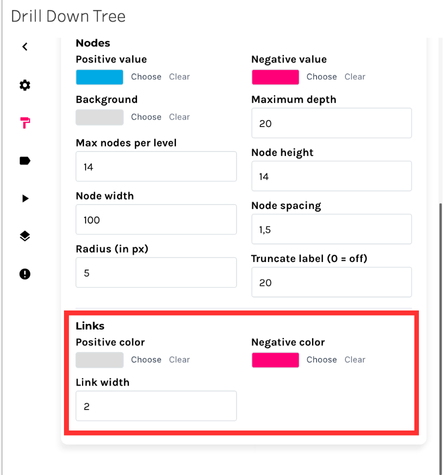
### Links&#x20;

<figure><img src="https://3696064508-files.gitbook.io/~/files/v0/b/gitbook-x-prod.appspot.com/o/spaces%2Ffen81laUQFBf286HYARr%2Fuploads%2FHilJig0ZdHlMqVGqSlGo%2Fimage.png?alt=media&#x26;token=02e777fb-b903-40e4-8e8f-abff7ac5cb7c" alt=""><figcaption></figcaption></figure>

| Setting        | Description                                            |
| -------------- | ------------------------------------------------------ |
| Positive color | You can select the color for links with positive value |
| Negative color | Select a color for links with negative value           |
| Link width     | To control the thickness of the link.                  |